 NikPak
Technical guide
The complete technical guide: architecture and the .nik format, the compression engine and the media codecs, the encryption design and quantum resistance, hardening, the full benchmarks, and the build, test and roadmap notes.
1 Introduction
nikpak
is a command-line archiver for the .nik
format. It was designed around four ideas: compress better than the
established tools, do it faster, protect data with modern
cryptography, and run unchanged on Windows, macOS and Linux as a
single small executable.
1.1 Design goals
- Small. Beat RAR 7 on the data people actually archive in bulk. Audio, images and tracker music are detected by content and compressed with specialised lossless codecs; everything else uses a tuned, multi-threaded Zstandard stream.
- Fast. Compression and extraction should be limited by the disk, not the CPU. At its fast level -m2 nikpak archives about 200 MB of source files in under a second on one core.
- Safe. Authenticated encryption with a memory-hard key derivation function, file names always hidden, tampering always detected, and an extractor that cannot be tricked into writing outside its destination folder.
- Quantum-resistant. Only 256-bit symmetric cryptography is used. There is no RSA, no elliptic-curve and no Diffie-Hellman code anywhere in nikpak, so there is nothing for Shor's algorithm to break.
- Portable
and scriptable.
One statically linked executable, RAR-compatible command line,
predictable exit codes, and a
-helpthat documents every option.
1.2 Results at a glance
| Measure | Result | Compared with |
|---|---|---|
| BMP photographs | 38.8 % smaller | RAR 7.00 -m5 |
| Stereo music, 44.1 kHz 16-bit | 14.6 % smaller (on par with FLAC -8) | RAR 7.00 -m5 |
| ProTracker MOD files | 13.3 % smaller | RAR 7.00 -m5 |
| Mono audio, 8-bit and 16-bit | 12.2 % and 15.3 % smaller | RAR 7.00 -m5 |
| 197 MB of source files, maximum level | 5.5 % smaller (24.4 MB vs 25.9 MB) | RAR 7.00 -m5 -s -md256m |
| Same data, fast level -m2 | 0.9 s | RAR 7.00 -m3 solid: 16.7 s |
| Encryption | Argon2id + XChaCha20-Poly1305 | RAR5: AES-256-CBC + PBKDF2 |
| All 10 test sets, maximum level, vs 7-Zip | 2.4 to 31.7 % smaller | 7-Zip 23.01 -mx9 (section 11.7) |
| Office files (doc, docx, xls, xlsx, csv, pdf) | 31.7 % smaller | 7-Zip 23.01 -mx9 (section 11.7) |
| All 10 test sets, maximum level, vs ZIP | 19.9 to 60.4 % smaller | ZIP -9, Info-ZIP 3.0 (section 11.7) |
| Executable | one file, no dependencies; about 9 MB with the window, 2.3 MB command-line only | Windows, macOS, Linux |
|
How
the numbers were obtained All measurements come from one machine (Linux x86-64 virtual machine, one CPU core) with RAR 7.00 and nikpak 1.1.0. Every archive was extracted again and compared with the original byte for byte. The complete method, the corpora and the cases where RAR is faster are described in chapter 11. |
1.3 Who is it for?
nikpak is aimed at people who archive large amounts of media or source code and care about size and speed, at developers who want a scriptable archiver with sane exit codes and a documented format, and at anyone who needs strong encryption without trusting a closed implementation. Because the command line follows RAR conventions, front-ends such as Total Commander can drive it with little or no reconfiguration.
1.4 How to read this guide
Chapters 2 and 3 describe what nikpak does and how to use it. Chapters 4 to 7 explain the architecture, the file format, the compression engine and the media codecs. Chapters 8 to 10 cover encryption, quantum resistance and hardening. Chapter 11 presents the benchmarks, chapter 12 compares nikpak with RAR honestly, and chapters 13 to 15 deal with building, testing and the roadmap.
1.5 Community and contact
News, questions, ideas and bug reports: nikpak's author can be reached on
- Telegram https://t.me/cryptonikko
- X https://x.com/cryptonikkoid
- Discord https://discord.com/users/1537826350759415811
The same three links are shown as round, coloured buttons at the bottom of the nikpak window, under the destination folder (section 3.7), and at the end of nikpak -help.
2 Feature overview
2.1 Capabilities
| Area | What nikpak provides |
|---|---|
| Compression | Zstandard (multi-threaded, solid) at -m1 to -m4, with a 128 MiB window and long-distance matching at -m4. At -m5 a multi-engine body: LZMA2 for binary data and PPMd for text, chosen by trial; files sorted by type as in 7-Zip. |
| Media intelligence | Content-based detection of WAV, AIFF, ProTracker MOD and BMP; per-file trial between four filters (NAC, Shuffle, Shuffle+Delta, MED); automatic fallback to plain compression. |
| Office, PDF, gzip | Deflate recompression (preflate): the Deflate streams inside docx, xlsx, pptx, odt, ods, epub, jar, zip, pdf and gz files are decoded, compressed far better and rebuilt bit for bit on extraction (-m4, -m5). |
| Encryption | Argon2id (64 MiB) key derivation, XChaCha20-Poly1305 in 64 KiB authenticated chunks; names, sizes, dates and permissions are encrypted. |
| Passwords | Interactive prompt with confirmation, environment variable, stdin, command line; automatic generation of a strong random password when none is supplied. |
| Integrity | CRC32 of every file's original bytes; AEAD authentication for encrypted archives; end marker with entry count; self-verifying audio codec. |
| Command line | RAR-style commands (a x e l v lb t p d), extraction of single files, folders or wildcards, and switches, zip-style aliases, wildcards, @listfiles, exclusions, overwrite policies, quiet mode, explicit exit codes. |
| Safety | Zip-slip protection, symlink refusal, setuid stripping, bounded decoders, atomic archive writes, Rust memory safety. |
| Portability | Windows (PowerShell, cmd), macOS, Linux; single static executable; byte-exact results on every platform. |
| Graphical interface | Started without arguments, nikpak opens a minimalist drop window: drop (or choose) files or folders to compress them with the best compression; progress ring, remembered destination folder (section 3.7). |
| Archive browser | unNik.exe, free for everyone: browse folders, search, view text and binary files, extract a selection and delete files in .nik archives (section 3.9). |
| Skins | 55 window skins, including 14 painted scene skins; a skins box that stands beside the window with Apply Skin and Cancel; import your own Nikkomander .skin.json files (section 3.10). |
| File-manager menu | A “NikPak” submenu in Explorer, Dolphin, Nemo, Nautilus and Finder: Add to archive, Extract here, Extract to its own folder, Open with unNik; one archive for a selection of several items (section 3.11). |
2.2 nikpak and RAR side by side
The table below compares nikpak 1.1 with RAR 7 as measured in this project, and states plainly where RAR is ahead. Chapter 12 discusses the individual points.
|
| nikpak 1.1 | RAR 7 |
|---|---|---|
| Media compression | Specialised lossless codecs chosen per file by trial | General algorithm with built-in filters |
| Source code, maximum level | 24.4 MB (smaller), 45.6 s | 25.9 MB, 26.7 - 36.2 s |
| Speed at fast levels | 0.9 s for 197 MB (-m2) | 9.7 - 16.7 s (-m3) |
| Encryption | Argon2id + XChaCha20-Poly1305 (authenticated) | AES-256-CBC + PBKDF2-HMAC-SHA256 |
| File names always encrypted | Yes | Only with -hp |
| Memory-hard password hashing | Yes (64 MiB) | No |
| Random password generator | Built in | Not built in |
| Source code, language | Full source, Rust (memory safe) | Proprietary, C++ |
| Recovery records, volumes, SFX, in-place update | Not yet | Yes (WinRAR) |
| Track record | New, not yet audited | Decades |
3 Command-line reference
nikpak
follows the syntax that RAR users know: nikpak .
Options may appear anywhere before the archive name or after it; --
ends option parsing.
3.1 Commands
| Command | Meaning |
|---|---|
a |
Create
a new archive. .nik
is appended when the name has no extension. Folders are always
recursed. |
x |
Extract
with full paths: everything, or only the names, folders and
wildcards given after the archive name (nikpak x backup.nik
Docs/report.pdf extracts one file). A trailing path separator (or
-d dir)
selects the destination. |
e | Extract without paths: every file goes straight into the destination folder. |
l | List the contents (all, or only the matching names): attributes, size, date (UTC), name, totals. |
v | Verbose list: adds the CRC32 of every file. |
lb | Bare list: one name per line, designed for scripts and GUI front-ends. |
t | Test: decompresses everything, checks every CRC32 and, for encrypted archives, verifies authentication. |
p | Print files to standard output: all of them, or those named (nikpak p notes.nik todo.txt | more). |
d | Delete files or folders (a folder takes its contents) from an archive. The archive is written again without them; encrypted archives keep their password. Names are required. |
mt | Media test: detects WAV/AIFF/MOD/BMP files and shows the size each media filter achieves. Writes nothing. |
(none) | Started without any argument (for example by double-clicking nikpak.exe), nikpak opens its window instead (section 3.7). |
3.2 Options
| RAR style | zip style | Meaning |
|---|---|---|
-p |
-e | Encrypt / decrypt, ask for the password. An empty entry generates a random password and displays it. |
-p |
-P | Password on the command line (visible to other users of the machine). |
-hp[password] |
| Same as -p. File names are always encrypted in nikpak. |
-m0
.. -m5 |
-0
.. -9 | Store, fastest, fast, good, high (adds Deflate recompression), maximum (the default since 1.2.1; LZMA2/PPMd, section 6.7). Use -m2 when speed matters more than size. |
-mt |
| Number of threads, 1 to 256 (default: all cores). |
-mc-
/ -mc+ |
| All content filters (media codecs and Deflate recompression) off / media filters always on. Default: automatic per-file trial. |
-r |
| Recurse into folders (always on, accepted for compatibility). |
-ep |
-j | Store only the last path component of every argument. |
-ep1 |
| Do not store the name of the base folder of a folder argument. |
-o+ |
-o | Overwrite existing files without asking. |
-o- |
-n | Skip existing files without asking. |
-or |
|
Rename
extracted files that already exist: name (1).ext. |
-y |
| Assume Yes to every question. |
-x |
-x | Exclude files; may be repeated. |
-d |
-d |
Destination
folder for x
and e. |
-inul
-idq |
-q | Quiet: only errors are printed. |
@listfile |
| Read file names from a text file, one per line. |
-h
-help
-? |
|
Full
help. -V
prints the version. |
Options
that RAR front-ends commonly send but that have no meaning here (-s,
-ma5,
-md64m,
-ibck,
-idp,
-rr,
-ts*,
-w
and similar) are accepted and ignored, so existing tool
configurations keep working. Anything else produces a clear error
message and exit code 7.
The
file-manager menu adds a few long options (section 3.11): nikpak --add
and --add-here
compress the given items into a new archive, nikpak --install-menu
and --uninstall-menu
add or remove the right-click menu (--all-users
for an all-users install), and unNik --extract,
--extract-here
and --extract-to
drive extraction from the menu.
3.3 Passwords in detail
When
an archive is created with -p,
nikpak resolves the password in this order, and never fails merely
because none was given:
-por-Pon the command line: used as is (minimum 8 characters).- The
environment variable
NIKPAK_PASSWORD, which keeps the password out of the process list. - An interactive prompt, asked twice for confirmation. An empty entry generates a random password.
- Without a terminal (for example inside a GUI), a password piped on stdin; if there is none, a random password is generated.
A generated password has 24 characters from an alphabet of 56 unambiguous symbols (no 0/O, 1/l/I), about 139 bits of entropy. It is printed once in a box on the console. There is no recovery: an archive whose password is lost cannot be opened by anyone.
When opening an encrypted archive nikpak uses the same sources and then fails with exit code 11 and an explanatory message; it never generates anything, because a generated password could not match.
3.4 Exit codes
| Code | Meaning | Typical cause |
|---|---|---|
| 0 | Success |
|
| 1 | Warning | Some files were skipped (unreadable, unsafe path, symlink) |
| 2 | Fatal error | Cannot create or read a file, internal error |
| 3 | Corrupt archive or CRC error | Damaged or truncated archive, failed checksum |
| 7 | Command-line error | Unknown option, missing archive name |
| 10 | Nothing matched | No file matched the names or wildcards |
| 11 | Wrong or missing password | Bad password, or a tampered encrypted archive |
3.5 Examples
nikpak a backup.nik C:\Docs\*.txt Photos\ # create an archive
nikpak a -m5 -mt8 big.nik Projects\ # maximum, 8 threads
nikpak a -p secret.nik Taxes2026\ # encrypted, prompts
nikpak a -pMyLongPassw0rd s.nik f.pdf # password given
nikpak x backup.nik C:\Restore\ # extract with paths
nikpak e backup.nik *.jpg C:\Pics\ # only *.jpg, flat
nikpak x backup.nik Docs/report.pdf # extract ONE file
nikpak e backup.nik Docs/report.pdf -d C:\Out # one file, no path
nikpak x backup.nik Photos -d C:\Restore # one folder
nikpak l backup.nik *.pdf # list only PDFs
nikpak p backup.nik notes.txt # show a file
nikpak d backup.nik Temp *.bak # delete entries
nikpak l backup.nik # list
nikpak t secret.nik # test (asks password)
nikpak mt song.wav tracker.mod photo.bmp # which filter wins?
3.6 Integration with Total Commander and other front-ends
Because
nikpak accepts RAR's command syntax (a,
x,
e,
l,
t,
@listfile,
-p,
-ep1,
-o+,
-y,
-m),
a program that can drive an external rar.exe
can drive nikpak.exe.
In Total Commander, register the extension nik
under Configuration,
Packer, Additional packer programs
and point the packer and unpacker commands to nikpak.exe.
Use -o+
or -y
for unattended extraction, because without a console nikpak cannot
ask whether to overwrite and will skip existing files instead. Menu
names differ between Total Commander versions; consult its built-in
help for the exact fields.
|
Folders
with spaces on Windows A quoted path that ends in a backslash, such as "C:\My Folder\",
is mis-parsed by Windows (the final quote is treated as escaped).
For destinations with spaces use -d "C:\My Folder"
instead. |
3.7 The graphical interface
nikpak started without arguments, for example by double-clicking nikpak.exe, opens a small window instead of printing its usage. It does one thing: compress what you drop on it.
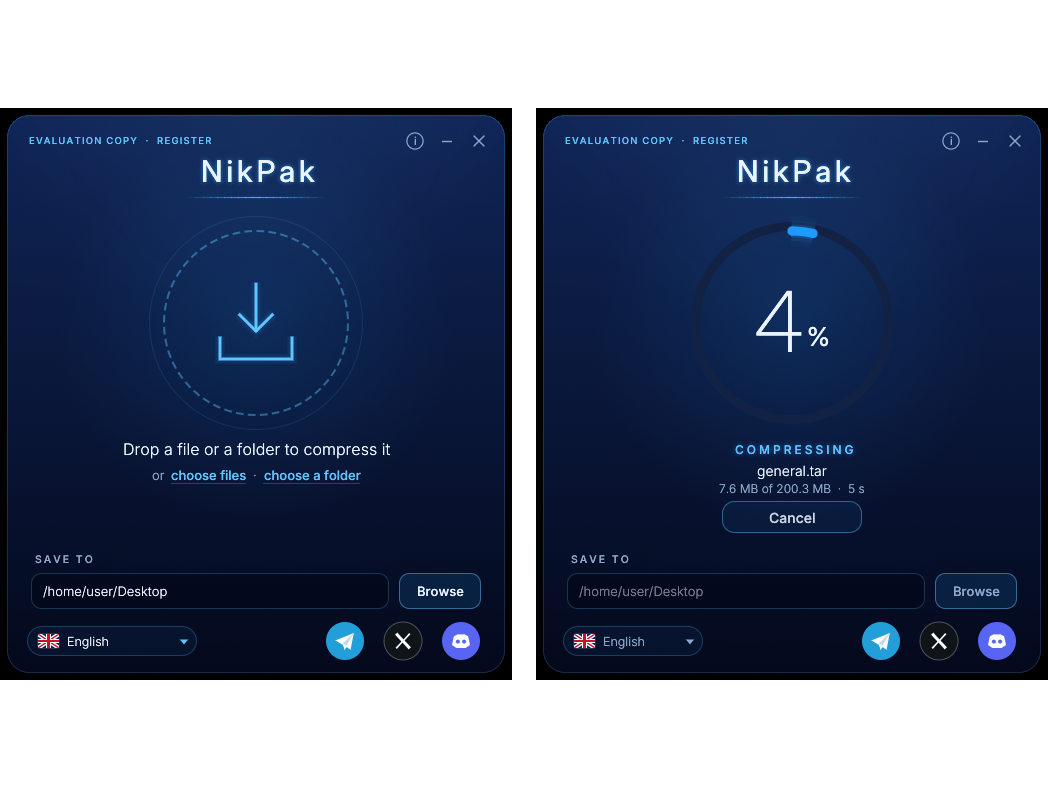
- Drop a file or a folder, or several at once, on the window, or click the circle (or the links choose files / choose a folder) to pick them in a dialog; clicking the circle shows the two buttons Choose files and Choose a folder inside the ring. They are compressed with the best compression (-m5) into one archive named after the file (without its extension), the folder, or, for several items, the folder they came from. An existing archive is never overwritten: report.nik becomes report (2).nik.
- Progress is shown as a large percentage inside a circular meter, with the phase (analysing, compressing, finishing), the amount processed and the time. The Cancel button under it (or the Esc key) stops a long compression at once and removes the unfinished archive; the window stays open for the next one. Closing the window during a compression does the same.
- Done: the ring turns green and shows the archive name, its size against the original and the time. Show in folder opens it in Explorer, Finder or the file manager; Compress more (or a click on the circle) starts the next one.
- Save to: the destination folder at the bottom can be typed in or chosen with Browse. It is remembered for the next time (Windows: %APPDATA%\nikpak\settings.txt; macOS: ~/Library/Application Support/nikpak; Linux: ~/.config/nikpak). The first time it is the Desktop.
- Community: the three round buttons at the bottom right open nikpak's Telegram, X and Discord pages (section 1.5).
- Switch to unNik: the round button with an up arrow, left of the i button, closes NikPak and starts unNik (section 3.9). After a compression, it and the link Open in unNik on the done screen open the new archive at once. The button is disabled while compressing.
- Open the destination folder: the folder button between the Save to field and Browse opens that folder in Explorer or Finder; after a compression it opens it with the new archive selected.
- Sounds: a soft click for buttons, links and options, and a short sound for each action (work starting, success, error, cancel, switching program, files hovering over the window). They are made by the program itself, no sound files. The speaker button in the title bar switches them off and on; they are on by default, and the choice is shared with unNik.
- Language: the button at the bottom left, with a flag and the language's own name, opens a menu of the ten most spoken languages in the world (Ethnologue 2025): English, 中文 (Mandarin Chinese), हिन्दी (Hindi), Español, العربية (Arabic), Français, বাংলা (Bengali), Português, Русский (Russian) and Bahasa Indonesia. Choosing one saves it and restarts nikpak in that language. The first time, nikpak follows the language of Windows (or of the system), else English. The command line stays in English.
- Running as administrator: Windows does not allow dragging files from Explorer onto a program that runs as administrator. When nikpak.exe is started as administrator (for example from an administrator PowerShell), it restarts itself once as a normal user through Explorer so that drag and drop works. If that is not possible, the window shows a notice; choose the files with the buttons instead.
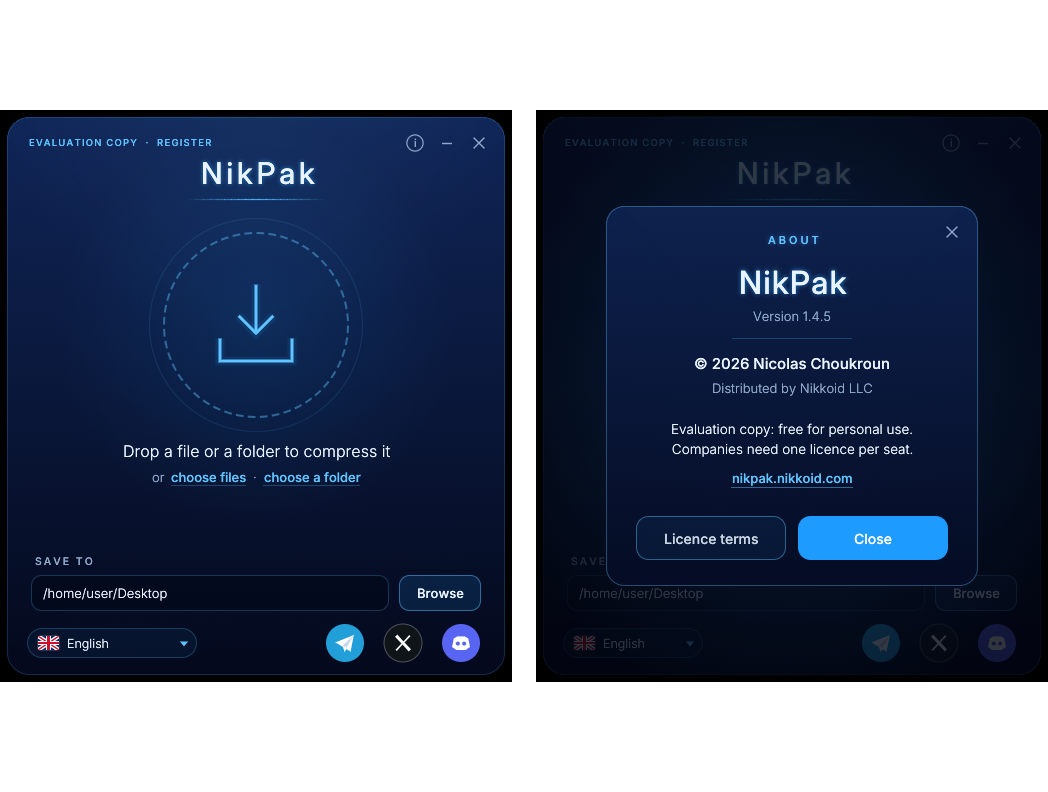
- Status and About: the top left shows EVALUATION COPY · REGISTER (a click opens the registration box) or REGISTERED TO and the licence holder. The small i button at the top right, next to minimise and close, opens the About box: version, © 2026 Nicolas Choukroun, distributed by Nikkoid LLC, the licence status, the web site and the licence terms (LICENSE.txt).
The
window measures 500 × 560 points (about 9:10), so a screenshot of
the whole window fits an X (Twitter) picture post without cropping.
It is frameless: drag it by its top area; the buttons at the top
right open the About box, minimise and close it. When nikpak.exe is
started from Explorer, the console window Windows opens for it is
closed automatically; started from a command prompt, the prompt is
left alone. Without a graphical display (for example over SSH),
nikpak prints its usage as before. The interface uses egui/eframe and
embeds subsets of the Inter, Noto Sans SC, Noto Sans Devanagari, Noto
Sans Bengali and Noto Sans Arabic typefaces (SIL Open Font License,
see assets/fonts/OFL.txt). A command-line-only executable is built
with cargo build --release --no-default-features.
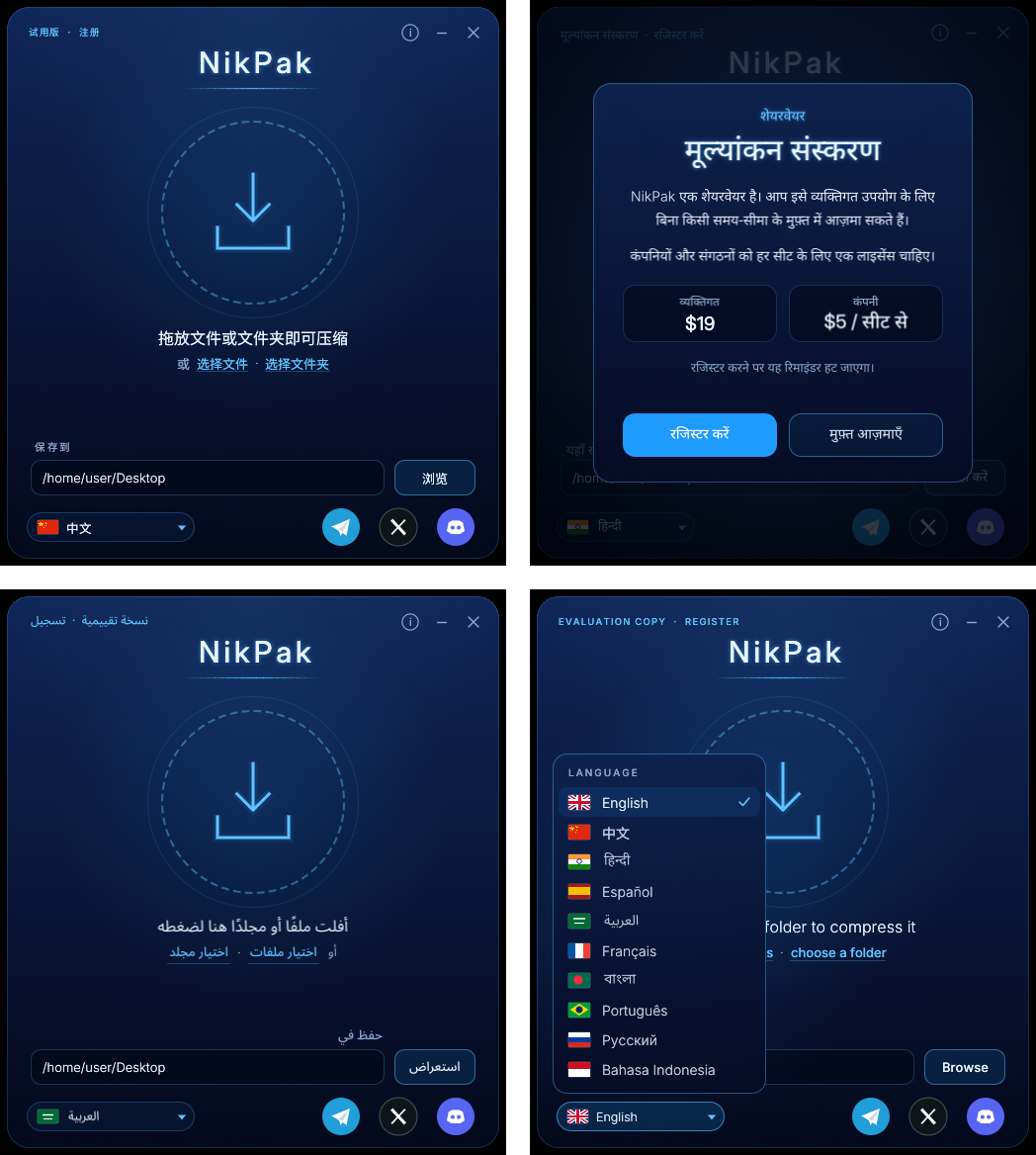
Hindi, Bengali and Arabic need shaping: letters change form and join, vowel signs move around their consonant, and Arabic runs right to left. egui draws one glyph per character, which would print these languages wrongly, so nikpak orders such texts with the Unicode bidirectional algorithm (unicode-bidi), shapes them with rustybuzz (a Rust port of HarfBuzz), rasterises them with ab_glyph and paints the result as an image (textshape.rs). Latin words and numbers inside them keep the Inter font. Long translations are reduced to fit their buttons, and boxes grow with their text. The translations (i18n.rs) were written with machine assistance; a review by native speakers is welcome.
3.8 Licence and registration (shareware)
NikPak is shareware, © 2026 Nicolas Choukroun, distributed by Nikkoid LLC, and licensed like WinRAR: the same package is the free evaluation copy and, once a licence key is entered, the registered version. Nothing is disabled in the evaluation copy.
| Who | Terms |
|---|---|
| Individuals | Free for personal, non-commercial use, without time limit. A personal licence ($19) removes the reminder; it covers all the computers the holder uses. |
| Companies and organisations | One company licence per seat, after a free 40-day evaluation; seats are computers or users, whichever is higher. Volume prices per seat, modelled on WinRAR: 1–9 seats $19, 10–24 $15, 25–49 $12, 50–99 $9, 100–199 $7, 200–499 $6, 500 and more $5. |
| Distribution | The unmodified package (with LICENSE.txt and THIRD-PARTY-NOTICES.txt) may be put on any shareware or download site; adding keys, key files or cracks is forbidden. .nik archives are royalty-free. |
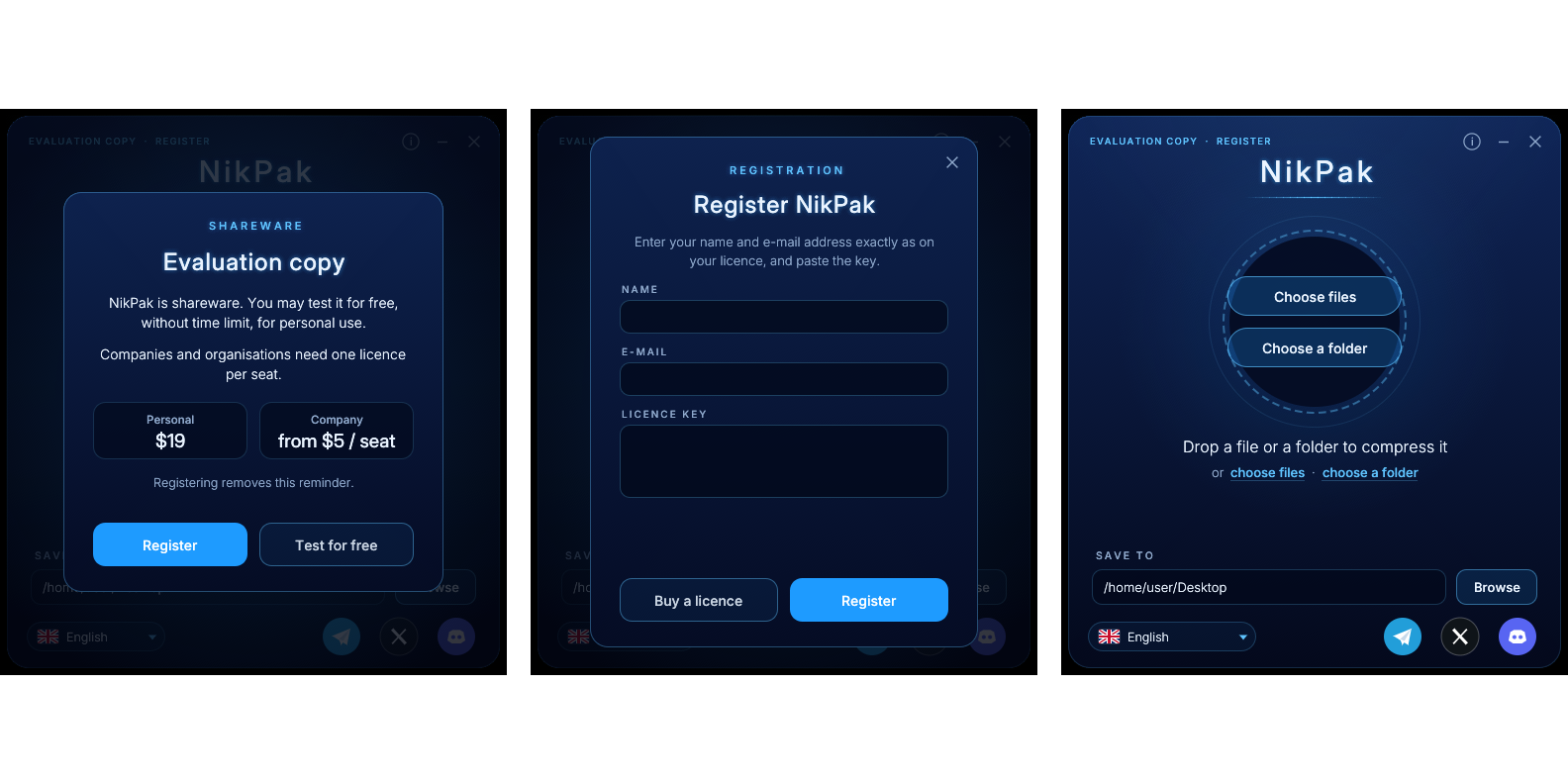
- The reminder appears when an unregistered copy opens its window. It has two buttons, Register and Test for free, whose left/right order changes at random at every start. Test for free (or Esc) closes it; nikpak then works with no restriction.
- The registration box asks for the name, the e-mail address and the licence key. All three must match: the key is a signature of the name and e-mail. Case, extra spaces and the look-alike characters O/0 and I/L/1 do not matter. Buy a licence opens https://nikpak.nikkoid.com/buy.php.
- Once
registered
nikpak never asks again on that computer for that user. The licence
is stored in %APPDATA%\nikpak\license.txt (macOS:
~/Library/Application Support/nikpak; Linux: ~/.config/nikpak). A
company can instead put a file
nikpak.keynext to nikpak.exe, which registers every user of that PC. - Command
line:
nikpak register "Jane Doe" jane@example.com NPK1-…registers;nikpak licenseshows the status;nikpak unregisterremoves the licence.nikpak -Vandnikpak -helpshow the status too. Unregistered copies print a one-line evaluation notice on the error output (stderr), never on standard output; -q suppresses it.
How the keys work
A
licence key reads NPK1-
followed by 108 characters in groups of five (Crockford base32). It
contains the licence type (personal or company), the number of seats
and an Ed25519
signature
of NIKPAK-LICENSE-1,
the type, the seats, the name and the e-mail address, each normalised
(spaces collapsed, lower case). nikpak contains only the 32-byte
public key, in src/license_pubkey.rs,
so studying the program does not allow anyone to make keys.
Keys
are made with the private key, which never leaves Nikkoid LLC: either
with the private tool nikpak-keygen
(cargo run --release --features keygen --bin nikpak-keygen -- make --name "Jane Doe" --email jane@example.com;
--company --seats 25
for companies; newkeys
creates a new key pair) or on the web server with the PHP kit in
server/
(PHP 7.2+, MySQL 5.7), which issues one key per payment and produces
exactly the same keys. server/README.md describes the setup and the
payment flow.
3.9 unNik, the free archive browser
unNik (unNik.exe) is the second program of the package. It opens .nik archives, shows what is inside and extracts what you choose. It is free for everyone, companies included, with no registration and no reminder (LICENSE.txt, section 2a). The setup installs it next to nikpak.exe, adds it to the Start menu and makes it the program for .nik files, so a double-click on an archive opens it in unNik; unNik archive.nik does the same from a command prompt.
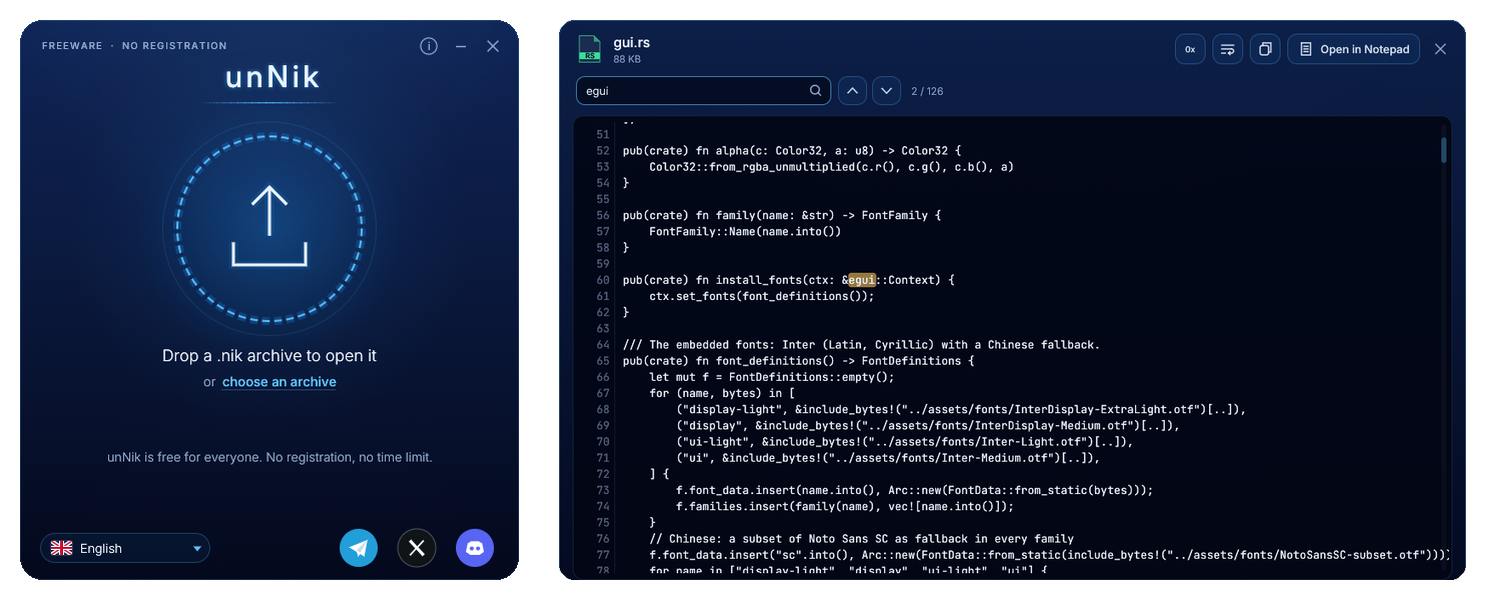
The empty window looks exactly like NikPak's, with an arrow going up in the ring. Drop a .nik archive on it, click the ring, or choose one of the recent archives: the window grows into the browser (1120 × 720, resizable from its edges, and it can be maximised). Encrypted archives ask for their password first.
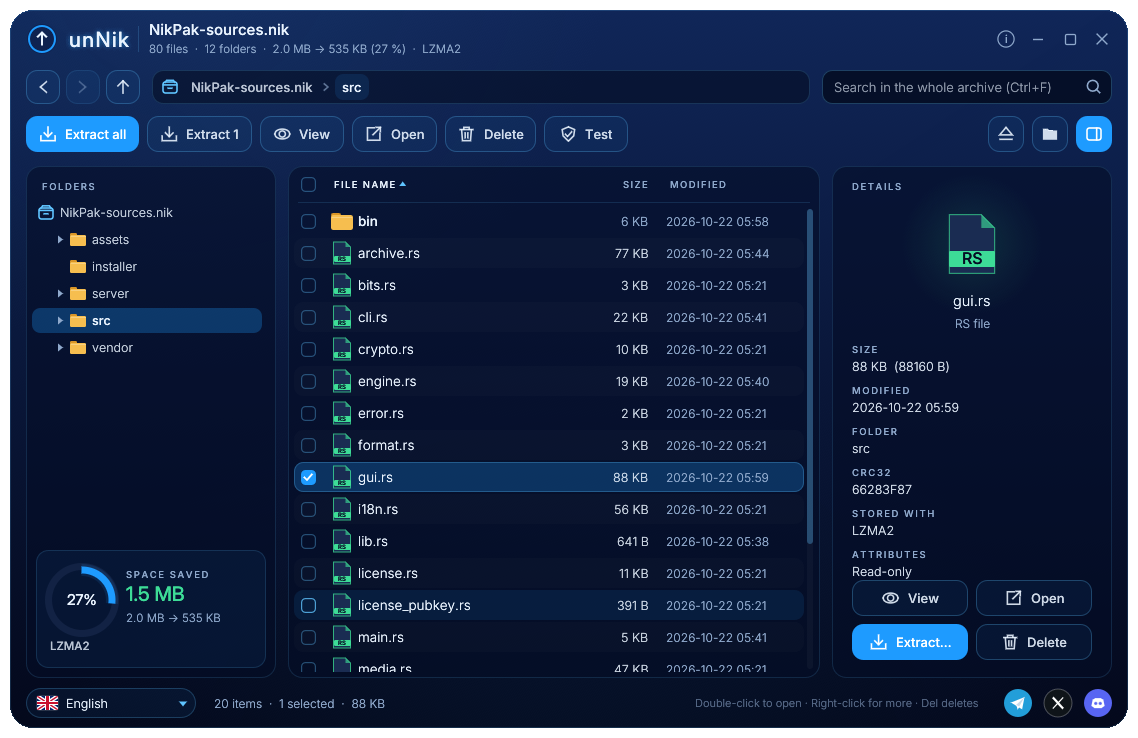
- Navigate with the folder tree, the breadcrumbs, Back, Forward and Up (Alt+Left, Alt+Right, Backspace) and double-clicks. Search (Ctrl+F) finds files by name in the whole archive; each result shows its folder.
- Select with a click, Ctrl+click, Shift+click, the check boxes, Ctrl+A or the arrow keys. Click a column title to sort by name, size, type or date. A right-click opens a menu with every action.
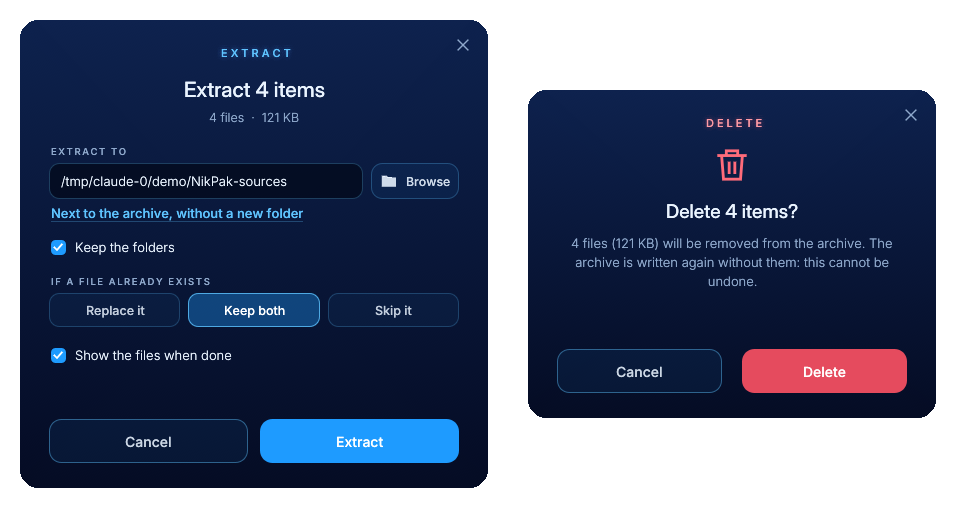
- Extract all, or the selection (Ctrl+E): choose the destination (by default a folder named after the archive, next to it), keep the folders or not, and what to do when a file already exists: replace it, keep both (name (1).ext) or skip it. Files taken from inside a folder are created without that folder's path, as in WinRAR. Reading stops right after the last chosen file.
- View (F3, or a double-click on a text file): text with line numbers, search with highlighting, line wrapping and copy; binary files in hexadecimal. The first 16 MB are shown; Open in Notepad opens the whole file. Open starts a file with its own program (it is extracted to a temporary folder first).
- Delete (Del) removes files and folders from the archive after a confirmation. The archive is solid, so it is written again without them, into a temporary file that replaces the original only when everything succeeded. Encrypted archives keep their password; the other entries keep their media or Deflate filter and their -m5 engine.
- Test decompresses the whole archive and checks every file. The details pane shows the size, date, folder, CRC32, how the file is stored and its attributes; for the archive itself its size, method and encryption. The summary under the tree shows the space saved.
- The same ten languages, language button, About box (i) and community buttons as NikPak. File names in any script are drawn with the system's fonts as a fallback.
- Switch to NikPak: the round button with a down arrow, left of the i button, closes unNik and starts NikPak. Both programs are found in the same folder. They share one settings file, so the language chosen in one is used by the other, and a window that is already open follows the change within two seconds.
- Open the destination folder: the button left of the eject button opens the folder of the last extraction in Explorer or Finder (before any extraction, the archive's folder). unNik plays the same sounds as NikPak, with sounds for opening an archive, extracting, deleting and testing; its speaker button and NikPak's share one setting.
3.10 Skins
NikPak and unNik share the same 55 window skins: the 41 skins of Nikkomander — from Nikkoid Blue (the default) and Nikkoid Bright to Dracula, Nord, Solarized, Classic Blue, Matrix, Pizza, Christmas and 8-Bit Game — plus 14 painted skins whose backgrounds are drawn by the program itself: Moon, America, Pattaya Neons, Burgers Tokyo, Sushi, Amiga, MSX, Colecovision, ZX Spectrum, Cat Life, Dog Life, Mario Bros, Counter Strike and Chess.
- Skins button (a palette, in the title bar of both programs): opens the skins menu, where every skin is drawn in its own colours. Pointing at a skin shows it on the whole window; a click keeps it; Esc or a click outside returns to the skin you had.
- Sun / moon button next to it switches between Nikkoid Blue (dark) and Nikkoid Bright in one click.
- The skins box stands outside the program. While the box is open the window widens by the width of the box, on the right: the program keeps its 500 × 560 panel and the box sits in the extra transparent space beside it, so the whole interface stays visible behind the skin being tried. The box can be dragged by its title bar back over the program or anywhere else in the window, and it has Apply Skin and Cancel buttons. A click on a skin tries it on the whole window; Apply keeps it and saves it for both programs; Cancel (or Esc or the ×) goes back to the skin you had. A click on the program no longer closes the box. unNik's window is not widened.
- The
chosen skin is saved
(
skin=in the settings file) and shared: a skin chosen in one program is taken by the other within two seconds. - Your
own skins:
“Import a skin…” at the bottom of the menu reads a Nikkomander
.skin.jsonfile (a name and a list of colours) and copies it to theskinsfolder next to the settings file; the × on an imported skin's tile removes it. - Painted
skins step behind the interface.
The painted backgrounds are drawn by
src/skin_scenes.rs, not by CSS gradients, so they scale to any window size. Since 1.6.2 each one passes through adiscreet()pass insrc/skin.rs: the art is pulled toward its own local mean, lightly blurred and faded toward the skin's background colour — most behind the drop ring and the text column, a little more over the logo — so the title, the ring and the status text stay crisp on all fourteen.
3.11 The file-manager menu
A
“NikPak” submenu in the file manager's right-click menu, like
WinRAR's, is installed by the setup (Windows: a checked-by-default
option; Linux: nikpak --install-menu;
macOS: Finder Quick Actions).
- On files and folders: Add to archive… (asks for the name and the folder, then compresses in the NikPak window) and Add to archive here (the archive goes next to the items, named like a drop on the window).
- On .nik archives: Open with unNik, Extract files…, Extract here and Extract to its own folder.
- Several items go into one archive; several selected archives are extracted one after the other in one window.
- The commands run through unNik.exe, so no console window flashes; the labels follow the language of NikPak. Windows 10 shows the submenu directly, Windows 11 under Show more options (Shift+F10); Linux adds KDE Dolphin service menus, Nemo actions and Nautilus scripts, and macOS adds Finder Quick Actions.
- New
command-line options used by the menu:
nikpak --addand--add-here(compress the given items),nikpak --install-menu,--uninstall-menuand--all-users;unNik --extract,--extract-hereand--extract-to. Extract here / to its own folder show unNik's small window with the progress ring (the password box for encrypted archives) and close it when everything is extracted; warnings and errors stay on screen. - A
second setup,
unnik-, installs unNik alone (the free browser) for people who only receive .nik archives; when NikPak is already installed it only installs the program, so the menus never double.-setup.exe
4 Architecture
nikpak is a single Rust program of about 9,600 lines (including its unit tests) in sixteen source files, plus the private licence tool nikpak-keygen. Its central design rule is streaming: files are read in 256 KiB pieces, pushed through a chain of writers, and never held in memory as a whole (the only exceptions are BMP pixel data, which is limited to 256 MiB, and the 64 KiB working buffers of the codecs).
4.1 Data flow when creating an archive
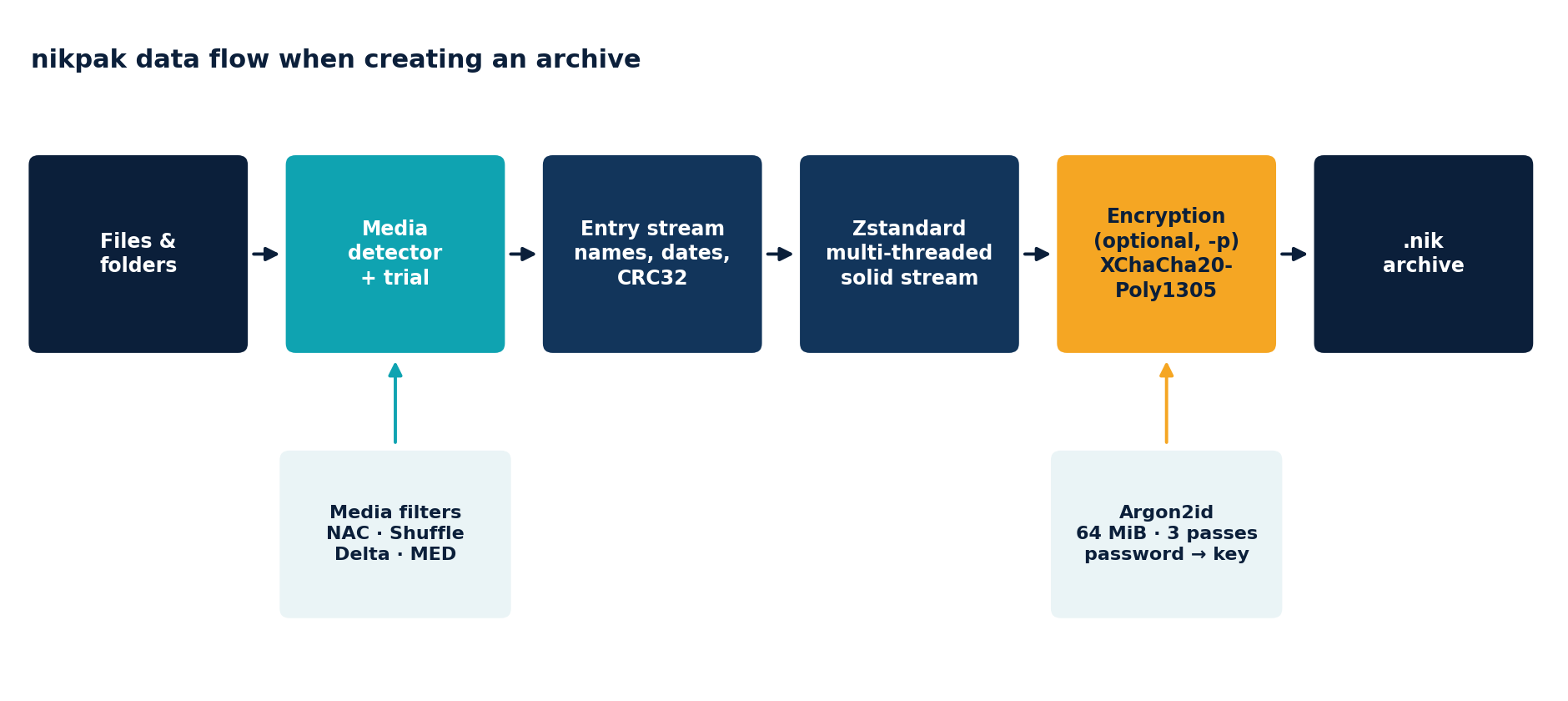
Every
stage is an implementation of the standard Write
trait wrapped around the next one, so the same code path serves a
plain archive, an encrypted archive, and the media trial.
4.2 Source code map
| File | Responsibility |
|---|---|
main.rs |
Entry
point. Parses arguments, dispatches the command, converts errors
to exit codes. Handles a closed pipe quietly (nikpak lb x | head). |
cli.rs |
Hand-written
RAR/zip-style argument parser, the option tables and the full
-help
text. Clap-style libraries cannot express switches such as
-pSECRET
or -m5
cleanly. |
archive.rs | Create, list, test, extract (by filters or by an exact choice), delete, print and the media test; also the index and single-file reading used by unNik. Contains the entry-stream writer and reader, overwrite policy and the atomic temp-file logic. |
media.rs | Content detection for WAV, AIFF, MOD and BMP; the Shuffle, Delta and MED filters; trial selection; CRC and chunk-framing helpers. |
nac.rs | The NAC lossless audio codec: stereo decorrelation, predictors, residual coding. |
bits.rs | MSB-first bit writer and reader used by NAC. |
crypto.rs | Argon2id key derivation and the XChaCha20-Poly1305 chunk writer and reader. |
format.rs | Constants of the on-disk format: magic, versions, record types, KDF limits. |
util.rs | Password prompting and generation, path sanitising, wildcard matching, date and size formatting. |
error.rs | The error type, its exit codes, and the classification of I/O errors (corruption versus system failure). |
engine.rs | Multi-engine body of -m5: block writer and reader, LZMA2 and PPMd engines, the engine trial (sections 5.6, 6.7). |
recomp.rs | Deflate recompression of ZIP containers, PDF and gzip with preflate (section 7.9). |
gui.rs | The graphical interface: drop window, progress ring, destination setting, community links (section 3.7). |
unnik.rs | unNik, the archive browser: tree, list, search, viewer, extract and delete boxes (section 3.9). |
lib.rs, bin/unnik.rs | The library shared by nikpak and unNik, and the entry point of unNik.exe (a window program, no console). |
license.rs | Shareware licence: key format, Ed25519 verification, licence storage, registration (section 3.8). |
i18n.rs | Translations of the window into the ten most spoken languages; language setting (section 3.7). |
textshape.rs | Shaped text for Hindi, Bengali and Arabic: bidi ordering, shaping, rasterising (section 3.7). |
4.3 Creating an archive, step by step
- Validate
the output location. An existing archive is only replaced with
-o+(or an interactive yes); otherwise nikpak explains that appending is unsupported. - Collect
the input: wildcards are expanded (PowerShell does not do it),
@listfilesare read, exclusions applied, symlinks and special files skipped with a warning, and the archive itself is never added to itself. - Resolve the password if encryption was requested (section 3.3) and derive the key with Argon2id.
- Write the header, then build the writer chain: file, buffered writer, optional chunk encryptor, Zstandard encoder.
- Write each entry. Media files go through detection and trial (chapter 7); everything else is copied in 256 KiB pieces while a CRC32 is computed.
- Write the end marker with the entry count, finish the Zstandard frame, seal the final encrypted chunk and flush to disk.
- Rename
name.nik.tmptoname.nik. If anything fails earlier, a guard object deletes the temporary file, so a half-written archive never replaces a good one.
4.4 Extracting an archive, step by step
- Read and validate the header: magic, version, flags, method and, for encrypted archives, the Argon2id parameters, which are range-checked before any memory is allocated.
- Obtain the password and derive the key. The first authenticated chunk then proves or disproves the password.
- Walk the entry stream. Each entry name is sanitised (section 10.1) before any file system access.
- Write
files
with
create_new, set timestamps and permissions, and verify the CRC32 of the reconstructed bytes. A file that fails its CRC is deleted rather than kept. - Verify the end of the archive: after the end marker the stream must really end and, if encrypted, the final authenticated chunk must have been processed. This catches truncation and appended data.
4.5 Memory and threading
Zstandard
uses worker threads for compression (all cores by default, -mt
to limit). Decompression, the audio codec and encryption run on the
calling thread. Argon2id needs 64 MiB for key derivation, and the
highest two levels use a 128 MiB match window, so decompressing such
archives needs up to that much memory.
5 The .nik container format
A
.nik
file is a small fixed header followed by a body. The body is one
solid
stream: all entries are concatenated, compressed together, and
optionally encrypted. Version 2 of the format adds media records;
version 1 archives remain readable.
5.1 Header
| Offset | Size | Field | Notes |
|---|---|---|---|
| 0 | 8 | Magic |
89 4E 49 4B 0D 0A 1A 0A
(the PNG idea: detects text-mode transfer damage) |
| 8 | 1 | Version | 3 (1 and 2 are still readable) |
| 9 | 1 | Flags | bit 0 = encrypted; other bits must be 0 |
| 10 | 1 | Method | 0 = store, 1 = Zstandard, 2 = multi-engine blocks (5.6) |
| 11 | 1 | Reserved | 0 |
| 12 | 4 | Argon2id memory (KiB) | encrypted archives only, little endian |
| 16 | 4 | Argon2id passes | encrypted only |
| 20 | 4 | Argon2id lanes | encrypted only |
| 24 | 16 | Salt | random per archive, encrypted only |
| 40 | 19 | Stream nonce prefix | random per archive, encrypted only |
The complete header (12 bytes, or 59 bytes when encrypted) is later authenticated as associated data of every encrypted chunk, so it cannot be altered without detection.
5.2 Entry records
Inside the (decrypted, decompressed) stream every entry is a record. All integers are little endian.
| Type | Layout |
|---|---|
0
END |
count:u64.
Marks the end and states how many entries precede it. |
1
FILE |
name_len:u16 name mtime:i64 mode:u32 size:u64 data[size] crc32:u32 |
2
DIR |
name_len:u16 name mtime:i64 mode:u32 |
3
MEDIA |
name_len:u16 name mtime:i64 mode:u32 size:u64 filter:u8 method:u8 params_len:u8 params framed_stream crc32:u32 |
- Names
are UTF-8 with
/separators, at most 4096 bytes. mtimeis Unix seconds;modeis the Unix permission word (Windows files get 0644 or 0755, 0444 when read-only).- The CRC32 always covers the original bytes, which is what makes the media filters verifiable.
- In
a MEDIA record
sizeis the original size. Theframed_streamis a series of[u32 length][bytes]chunks ended by a zero length, so a reader can always skip a media entry without understanding its filter.
Media parameters
| Filter | Params | Content |
|---|---|---|
| 1 Audio | 19 bytes |
offset:u64 frames:u64 channels:u8 bits:u8 flags:u8
(flag bit 0 = big endian, bit 1 = signed) |
| 2 Image | 21 bytes |
offset:u64 width:u32 rows:u32 bpp:u8 stride:u32 |
| 3 Deflate | 0 bytes |
none: the framed stream holds raw segments and recompressed Deflate streams (section 7.9) |
Everything
before offset
(headers, tags, palettes, MOD patterns) and everything after the
sample or pixel region (trailing chunks) is stored unchanged around
the filtered data.
5.3 Encrypted body framing
When the encrypted flag is set, the zstd output is cut into chunks of 64 KiB of plaintext. Each chunk is stored as a 32-bit big-endian length followed by the ciphertext, which is 16 bytes longer because of the Poly1305 tag. A chunk is only sealed when at least one more byte follows, so the last chunk is never empty and can be marked as final (section 8.3).
5.4 Why a solid stream?
Compressing all files as one stream lets the compressor find repetitions between files, which matters enormously for source trees and document collections (the benchmark in chapter 11 shows RAR's non-solid output being almost twice as large as its solid output on 10,949 files). The price is sequential access: extracting a single file requires decompressing what precedes it. nikpak reduces the cost of this for media entries by skipping over them without decoding.
5.5 Versioning
The version byte is checked against the highest version the program understands. A newer archive produces the message Unsupported archive version N; please update nikpak rather than a misleading corruption error. Unknown flags, methods or media filters are rejected the same way.
5.6 Multi-engine body (version 3)
Archives made with -m5 use method 2. The inner record stream described in 5.2 is unchanged, but it is cut, only between entries, into blocks, and every block is compressed with its own engine. Concatenated, the decompressed blocks are exactly the record stream of a single-engine archive, so listing, testing and extraction work the same way.
| Element | Layout |
|---|---|
| body | block* followed by a single 0 byte |
| block | engine:u8 parameters, then frames [u32 length 1 .. 1 MiB][compressed bytes], ended by a zero length |
| engine 1 | Zstandard (no parameters) |
| engine 2 | LZMA2 raw stream: dictionary size u32, lc u8, lp u8, pb u8 |
| engine 3 | PPMd variant I (PPMd8): order u8, model size u32, restore method u8 (0 = restart) |
The framing lets a reader find the end of every block without trusting the decoder, and every parameter is range-checked before memory is allocated (LZMA2 dictionary at most 1.5 GiB, PPMd model at most 1 GiB, order 2 to 16). When encrypted, the body is protected by the same authenticated chunks as any other archive (chapter 8).
6 The compression engine
6.1 Why Zstandard
Zstandard combines LZ77 matching with an entropy stage built from Huffman coding and finite-state entropy (FSE). Compared with the Deflate algorithm of ZIP it finds matches over a far larger window, models literals and match lengths with tighter entropy codes, and decodes at gigabytes per second. It is also an open, widely audited format, which keeps nikpak's data recoverable by independent tools.
6.2 Level mapping
nikpak
accepts both RAR-style levels (-m0
.. -m5)
and zip-style levels (-0
.. -9)
and maps them to Zstandard levels:
| Option | Zstandard level | Character |
|---|---|---|
-m0 | none (stored) | No compression, no media filters |
-m1 | 1 | Fastest |
-m2 | 3 | Fast; about 0.9 s for 197 MB on one core (the default until 1.2.0) |
-m3 | 9 | Good balance |
-m4 | 15 | High; 128 MiB window and long-distance matching; Deflate recompression (7.9) |
-m5 (default) | LZMA2 / PPMd | Maximum, and the default since 1.2.1: multi-engine body (6.7) and Deflate recompression |
The
zip-style levels map as follows: -0
stores, -1
to -6
use Zstandard 1 to 6, -7
uses 9, -8
uses 12 and -9
is the same as -m5.
6.3 Large window and long-distance matching
At
Zstandard level 15 and above nikpak enables a 2^27 byte (128 MiB)
match window and long-distance matching. Source trees, document sets
and backups contain many near-duplicate files that lie far apart in
the stream; a normal 8 MiB window cannot see across them. On the 197
MB test set this reduced the output at -m5
from 26.3 MB to 24.4
MB
and at -m4
from 29.5 MB to 26.8 MB, at no cost in speed for -m4
and a small one for -m5.
A window of 2^27 is within Zstandard's default decoder limit, so any
standard decoder can read the data.
6.4 Multi-threading
The encoder splits the input into jobs that run on worker threads (all cores by default). Compression speed therefore scales with the number of cores, while the format stays a single stream. All numbers in this guide were measured on one core; on a typical multi-core machine nikpak is considerably faster than shown.
6.5 Integrity inside the stream
The Zstandard frame carries its own content checksum, nikpak adds a CRC32 per file and an end marker with the entry count. A damaged plain archive is therefore detected at three levels: the frame checksum, the per-file CRC and the end marker.
6.6 Store mode
-m0
writes the entries uncompressed. It is useful for data that is
already compressed, and it is also the only mode in which media
filters are bypassed on purpose: a user who asks for store
does not expect the data to be transformed.
6.7 The maximum level: LZMA2 and PPMd
Zstandard is the right engine for speed, but at its strongest settings it is still a few per cent behind LZMA2 on source code and documents, and well behind PPMd on prose. Since version 1.2, -m5 therefore builds the archive from two blocks (format in 5.6):
- Binary block. Folders, binary files, media entries and Deflate-recompressed entries are compressed with LZMA2: preset 9, nice length 273, match-finder depth 32, and a dictionary sized to the data (1 to 128 MiB).
- Text block. Files whose first 64 KiB contain no zero byte and almost no control characters (source code, text, CSV, HTML, XML ...) go to a second block. Four contiguous 1 MiB runs of these files are trial-compressed with PPMd variant I (order 8, 192 MiB model) and with LZMA2 tuned for text (lc 4, pb 0), and the smaller result wins. Prose favours PPMd; large source trees with many near-identical files favour LZMA2, because it can copy long repeats across files.
- Order. Within each block, files are sorted by extension, then by file name, as 7-Zip does, so that identical or similar files are neighbours. Together with the contiguous trial sample, this made the general data set 7.5 % smaller.
"Extreme" LZMA2 settings were measured and rejected: on spreadsheet XML they were up to ten times slower and not smaller. -m5 runs on one thread, regardless of -mt.
7 Media intelligence
A general-purpose compressor sees bytes. It does not know that a WAV file is a waveform whose next sample is predictable from the previous ones, or that neighbouring pixels of a photograph are nearly equal. nikpak's media layer supplies that knowledge: it recognises such files, applies a lossless transform that exposes the redundancy, and lets the compressor (or a dedicated codec) exploit it. This is where nikpak gains most against RAR.
7.1 Detection by content
Detection
looks at the first bytes of each file of at least 8 KiB and never
trusts the extension, so a WAV renamed to .dat
is still found and a text file called .wav
is not.
| Type | How it is recognised | What is filtered |
|---|---|---|
| WAV |
RIFF..WAVE,
a fmt
chunk with integer PCM (format 1, or WAVE_FORMAT_EXTENSIBLE with
the PCM sub-format), 8/16/24/32 bits, 1 to 8 channels, consistent
block alignment; then the data
chunk | The sample region. A zero, oversized or bogus data length is clamped to the file; leftover bytes and trailing chunks are kept as they are. |
| AIFF / AIFC |
FORM..AIFF
or AIFC
(compression NONE
or twos),
COMM
and SSND
chunks, big-endian signed samples | The sound data region. |
| ProTracker MOD | Signature at offset 1080: M.K., M!K!, FLT4, 4CHN, 6CHN, 8CHN, FLT8, OCTA or CD81 | The 8-bit sample area after the pattern data (section 7.6). |
| BMP |
BM,
a DIB header of 40 bytes or more, no compression, 8, 24 or 32
bits per pixel, pixel rows that fit the file, region between 4
KiB and 256 MiB | The pixel rows (section 7.7). |
Not handled, and therefore stored with normal compression: floating-point WAV, ADPCM and other compressed audio, RLE or bit-field BMP, and tracker formats other than ProTracker MOD. Already compressed media such as MP3, JPEG, FLAC, PNG and MP4 are not recognised at all and are left alone, since transforming them would not help.
7.2 The trial: choosing the best filter per file
No single transform is best for every file. Predictive coding wins on recorded music; byte-plane separation wins on audio that came from an 8-bit companded source (where only about a thousand distinct 16-bit values occur); plain compression wins on silence and on highly repetitive tracker samples. nikpak therefore measures instead of guessing.
- Take a sample: the whole sample region when it is up to 3 MiB, otherwise three windows of 768 KiB at 5 %, 45 % and 85 % of the audio. For images, the first rows up to about 4 MiB.
- Compress the sample with plain Zstandard level 3 (the baseline) and with every filter that applies: NAC, Shuffle and Shuffle+Delta for 16/24/32-bit audio; NAC and Shuffle+Delta for 8-bit audio; MED for images.
- Keep the filter with the smallest estimate, but only if it beats the baseline by at least 2 %. Otherwise the file is stored with normal compression.
- Write the file with the winner. All of this happens per file, so one archive can contain WAVs coded with different methods next to ordinary files.
nikpak mt
runs the same measurement on the whole
file and prints a table, which is how the benchmark in chapter 11 was
explored. In the options, -mc-
disables the filters and -mc+
forces the default filter without a trial.
|
Lossless,
verified, and bypassable Every filter is exactly reversible. The CRC32 stored with each entry is computed over the original bytes and checked on extraction, the NAC encoder verifies each block while writing (section 7.4), and -mc-
turns the whole layer off. |
7.3 The NAC audio codec
NAC (nikpak audio codec) is a block-based lossless codec for integer PCM. It belongs to the same family as FLAC: linear prediction followed by Rice coding. It has its own bit-stream, designed for this archive, and is used for WAV, AIFF and the sample data of MOD files.
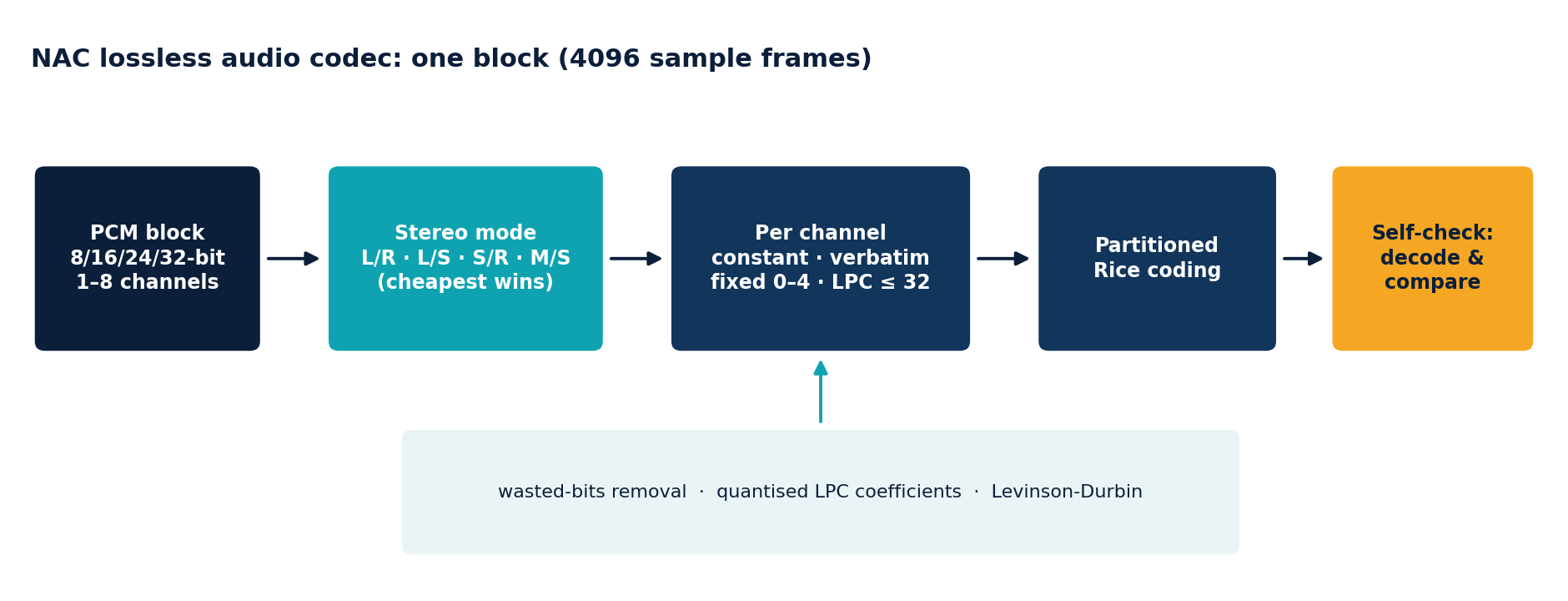
Blocks and stereo decorrelation
Audio is cut into blocks of 4096 sample frames, each coded independently, which makes the codec robust (an error cannot spread) and lets the encoder adapt to changing material. For stereo, the encoder chooses one of four representations per block:
| Mode | Channels coded | Reconstruction |
|---|---|---|
| 0 | Left, Right | direct |
| 1 | Left, Side | R = L - S |
| 2 | Side, Right | L = R + S |
| 3 | Mid, Side |
sum = (M << 1) | (S & 1),
L = (sum + S) >> 1,
R = (sum - S) >> 1 |
with
Side = L - R
and Mid = (L + R) >> 1.
The side channel needs one more bit than a normal channel and is
coded with bits + 1.
The mode is chosen cheaply: the encoder sums the absolute values of
the order-2 fixed-predictor residual of L, R, M and S and takes the
pair with the smallest total. For recordings whose channels are
strongly correlated, Mid/Side typically saves several percent.
Sub-frame types
Each coded channel of a block is stored as one of four sub-frames, whichever is smallest:
| Type | Use | Cost |
|---|---|---|
| Constant | All samples equal (digital silence) | 2 + sample-width bits for a whole block |
| Verbatim | Noise-like material, or the safety fallback | n x width bits |
| Fixed | Polynomial predictor of order 0 to 4 | warm-up samples + residuals |
| LPC | Linear predictor of order 1 to 32 with transmitted coefficients | coefficients + warm-up + residuals |
Wasted bits. If the low bits of every sample in a block are always zero (an 8-bit recording stored in 16-bit containers, or a quantised signal), they are removed and their count is stored in 5 bits.
Fixed predictors
order 0: e[i] = x[i]
order 1: e[i] = x[i] - x[i-1]
order 2: e[i] = x[i] - 2*x[i-1] + x[i-2]
order 3: e[i] = x[i] - 3*x[i-1] + 3*x[i-2] - x[i-3]
order 4: e[i] = x[i] - 4*x[i-1] + 6*x[i-2] - 4*x[i-3] + x[i-4]
The
first order
samples of a block are stored verbatim as warm-up values.
Linear predictive coding (LPC)
For tonal and harmonic music a predictor whose coefficients are fitted to the block is far better than a fixed polynomial. The encoder computes them as follows:
- Apply a Tukey window (taper over the first and last quarter) to the block, so that its edges do not distort the statistics.
- Compute
the autocorrelation
r[0..32]of the windowed signal. - Run
the Levinson-Durbin
recursion,
which yields the optimal coefficient set for every order from 1 to
32 in one pass:
k = (r[i] - sum a[j] r[i-j]) / err,a[i] = k,a[j] = a[j] - k a[i-j],err = err (1 - k^2). - Quantise
the real coefficients to integers with a precision of 12, 14 or 15
bits (depending on the sample width), choosing a power-of-two scale
(
shift, 0 to 20) so that the largest coefficient just fits. Rounding uses error feedback, so quantisation errors do not accumulate across coefficients. - Evaluate several orders (the set depends on the effort level, below), compute the residual of each, and keep the one with the smallest estimated total size, including the cost of sending its coefficients.
The predictor itself is pure integer arithmetic, which is what the decoder runs:
pred[i] = (q[0]*x[i-1] + q[1]*x[i-2] + ... + q[n-1]*x[i-n]) >> shift
e[i] = x[i] - pred[i] (n = order; the sum uses 64 bits)
Floating point is used only by the encoder to decide which integer coefficients to send. The decoder never touches floating point, so decoding is bit-exact on every processor and every compiler.
Residual coding
The
prediction errors are mapped to unsigned numbers with the zig-zag
transform (u = (e << 1) XOR (e >> 63),
so that small positive and negative values become small numbers) and
coded with partitioned
Rice codes.
The residual of a block is split into 2^p partitions (p from 0 to 8,
chosen by the encoder); each partition gets its own Rice parameter k
(5 bits). A value is written as u >> k
in unary (that many zeros and a one) followed by the low k
bits. The best k
of a partition is derived from the sum of its values, so the cost of
every candidate predictor can be estimated cheaply from running sums
instead of by encoding it.
Effort levels
The
level of the archive (-m
option) selects how many LPC orders are tried per block. More orders
mean a slightly smaller result and a slower encoder; the decoder
speed is the same.
| Archive level | NAC effort | LPC orders tried |
|---|---|---|
| -m1 | 0 | 8, 16 |
| -m2, -m3 | 1 | 4, 8, 12, 16, 24, 32 |
| -m4, -m5 | 2 | 2, 4, 6, 8, 10, 12, 14, 16, 18, 20, 24, 28, 32 |
Fixed predictors of order 0 to 4 are always tried. In the benchmark the effort level changed the stereo music result by less than 0.05 %: the large gain comes from using prediction at all.
Bit layout of a block
block := [stereo mode: 2 bits] sub-frame [sub-frame] (byte-padded)
sub-frame := type:2 ...
CONSTANT : value:width
VERBATIM : wasted:5 samples:(n x (width - wasted))
FIXED : wasted:5 order:3 warm-up residual
LPC : wasted:5 order-1:5 precision-1:4 shift:5
coefficients warm-up residual
residual := partition-order:4 per partition: k:5 Rice-coded values
Each block is stored in the archive with a 32-bit length in front, so the decoder always knows where the next block starts.
7.4 Self-verification
Writing
an archive is the only chance to detect an encoder bug, so the NAC
encoder does not trust itself. After encoding each block it decodes
the block again
and compares the result with the original samples. On any difference
it re-encodes the block as verbatim (which cannot fail) and checks
again; if even that fails, archiving stops with an explicit error and
the suggestion to use -mc-.
The fallback path is exercised by the unit tests, which force
verbatim coding for every combination of bit depth and channel count,
and the mechanism turns a possible silent data-loss bug into a
detected, recoverable condition.
On top of that, the decoder is fuzzed: thousands of blocks of random bytes and blocks with flipped bits are fed to it in the unit tests, and it must return an error without panicking or allocating unreasonable amounts of memory. During development this found a real bug (for 32-bit material the Rice-parameter search could come out empty and fall back to a parameter that would have produced a multi-gigabyte code); it is fixed and covered by a test.
7.5 Shuffle and Shuffle+Delta
Some audio does not respond to prediction. The gallery WAV files used in the benchmark are 16-bit, yet contain only about a thousand distinct sample values, because they were produced from a companded 8-bit source. A predictor cannot exploit that, and FLAC compresses them to 84 % of the original while plain Zstandard needs 63 %. What helps is arranging the bytes so that the compressor sees homogeneous data:
- Shuffle separates the bytes of the samples into planes: all least-significant bytes of channel 0, then all most-significant bytes of channel 0, then channel 1, and so on, in blocks of 32768 frames. The high-byte plane is smooth and the low-byte plane has a very restricted alphabet; Zstandard's entropy coder models each far better than the interleaved mixture.
- Shuffle+Delta first replaces every sample by its difference to the previous sample of the same channel (modulo the sample width, so it is exactly reversible, with state carried across blocks) and then shuffles. This helps when the signal is smooth but not predictable enough for NAC to win.
On
the 35 gallery files the archive with the best filter per file
(chosen by the trial) is 51 % of the original size at -m2
and 47 % at -m5,
against 63 % for plain Zstandard.
7.6 ProTracker MOD files
A MOD module is a 1084-byte header (title, 31 sample descriptors, a pattern order table of 128 entries and a 4-byte signature at offset 1080), then the pattern data, then the raw 8-bit signed samples of all instruments. nikpak computes where the samples start and how long they are:
patterns = max(order table) + 1
sample_start = 1084 + patterns * 256 * channels (4 ch: 1024 B per pattern)
sample_bytes = sum of (length in words * 2) over the 31 descriptors,
clamped to the end of the file
The header and patterns are stored as they are (the compressor handles those repetitive note events well) and the sample area is treated as a single mono, signed, 8-bit stream for the trial. Per file, NAC, Shuffle+Delta or plain compression wins: sampled instruments mostly favour NAC, while on some modules (for example those with very short or highly repetitive samples) plain compression wins. Truncated modules are handled by clamping the region to the data that is actually present.
7.7 BMP images
An uncompressed BMP stores rows of pixels padded to a multiple of four bytes. The filter works in four steps:
- Split the pixel region into one plane per channel (B, G, R, and A for 32-bit), remembering the per-row padding bytes separately.
- Decorrelate colour. Subtract the green plane from the blue and red planes (modulo 256). In photographs the three channels are strongly correlated, so the differences are small.
- Predict
each pixel
from its neighbours with the MED
(median edge detector) predictor, the one used by the LOCO-I image
coder: for left
a, aboveband above-leftc, the prediction ismin(a,b)ifc >= max(a,b),max(a,b)ifc <= min(a,b), anda + b - cotherwise. The prediction error replaces the pixel (modulo 256). On edges the predictor follows the edge; on smooth gradients it extrapolates the gradient. - Concatenate the residual planes and the padding bytes and let Zstandard compress them. Smooth regions become runs of near-zero bytes.
The decoder reverses the steps exactly. 8-bit BMPs skip the colour step; the trial then decides whether prediction helps for that palette, since predicting palette indices only makes sense for grayscale or smoothly ordered palettes. BMP files above 256 MiB are not filtered, to bound memory use.
7.8 Why this beats RAR
RAR compresses media with its general match-and-Huffman engine plus a small set of byte filters. nikpak instead gives audio a true predictive codec with per-block stereo decorrelation and adaptive Rice coding, gives images a proper 2-D predictor with colour decorrelation, and chooses per file by measurement. The consequence is visible in the benchmark: 12 to 15 % smaller on audio of every kind, 13 % on tracker music and 39 % on photographs, and the NAC result for the stereo track is within 0.2 % of the dedicated FLAC encoder.
7.9 Office documents, PDF and gzip: Deflate recompression
Modern office files are ZIP archives of XML (docx, xlsx, pptx, odt, ods), and PDF files store their pages in Deflate (FlateDecode) streams. Their content is therefore already compressed, and no archiver can shrink it much: in the 1.1 benchmark, 6.6 MB of .xlsx files only went down to 5.6 MB with 7-Zip. nikpak 1.2 removes that obstacle.
- Detection by content. A ZIP local header (PK\x03\x04) at the start of the file, %PDF- or a gzip header; the extension is never used.
- Decoding. Every Deflate stream is found (ZIP entries with method 8, PDF streams with a zlib header, every gzip member) and analysed with preflate (Microsoft's preflate-rs). preflate returns the plain data plus a small corrections record that describes exactly how the original encoder made its choices, whichever encoder it was.
- Storage. The file is stored as a sequence of raw segments and (plain, corrections) pairs. The plain XML or page description then goes into the solid stream, where LZMA2 compresses it to a fraction of its Deflate size.
- Verification. Before the result is used, nikpak rebuilds every Deflate stream and compares the length and CRC32 of the whole file with the original. If anything differs, or preflate fails or panics on a malformed file, the file is simply stored normally.
- Extraction. The Deflate streams are re-created bit for bit, so the extracted .docx or .pdf is byte-identical, and its CRC32 is checked as for every entry.
On the office set of section 11.7 this is what makes nikpak smaller than every other archiver. The 6.6 MB of .xlsx files contain 71 MB of XML once decoded, and that XML compresses far better than Deflate did. The cost is time: preflate analyses roughly 15 MB of plain data per second. For that reason recompression is used at -m4 and -m5 only, where it pays off (measured: -m3 gained 0.5 % for six times the time). Limits: files up to 512 MiB, and per stream up to 512 MiB of plain data and 64 MiB of corrections. -mc- turns it off.
8 Encryption
nikpak's encryption is built entirely from standard, well-studied components (the RustCrypto implementations of Argon2id and XChaCha20-Poly1305). No primitive was invented for this project; the work lies in combining them correctly.
8.1 Threat model
The design assumes an attacker who obtains the archive file and can study and modify it at leisure, and who can try unlimited password guesses offline. nikpak aims to guarantee:
- Confidentiality of file contents and of everything about them: names, sizes, timestamps, permissions and the number of files.
- Integrity and authenticity: any change to the archive, whether to the data, the header, the order of the data or its length, is detected before wrong data is accepted.
- Guess-resistance: every password guess is made as expensive as practical.
It does not hide that an archive exists, nor its approximate size, and it cannot protect against malware on the machine that creates or opens the archive, or against a weak password.
8.2 From password to key: Argon2id
A password is a poor key: short, predictable and typed by a human. It is turned into a 256-bit key with Argon2id, the winner of the Password Hashing Competition and the algorithm standardised in RFC 9106. Argon2id is deliberately memory-hard: computing one key needs a large block of memory that is filled and then repeatedly read in a data-dependent pattern. nikpak uses the RFC's low-memory profile:
| Parameter | Value | Meaning |
|---|---|---|
| Memory | 64 MiB | Every guess needs 64 MiB of fast memory |
| Passes | 3 | The memory is processed three times |
| Lanes | 4 | Degree of parallelism inside one derivation |
| Salt | 16 random bytes | New for every archive: identical passwords give different keys, and pre-computed tables are useless |
| Output | 32 bytes | The XChaCha20-Poly1305 key |
Memory-hardness is what separates Argon2id from the older PBKDF2 (used by RAR5 and by ZIP's AES mode): PBKDF2 needs almost no memory, so a graphics card or a custom chip can test enormous numbers of guesses in parallel. With Argon2id the attacker's hardware must supply 64 MiB per parallel guess, which removes most of that advantage. The cost to the legitimate user is a fraction of a second, paid once per archive.
The parameters are stored in the header, so future versions can raise them without breaking old archives. When reading, they are range-checked first (memory 8 x lanes up to 1 GiB, passes 1 to 64, lanes 1 to 64) so that a malicious archive cannot make nikpak allocate absurd amounts of memory before the password has been checked.
8.3 XChaCha20-Poly1305 in the STREAM construction
The bulk data is protected with XChaCha20-Poly1305, an authenticated-encryption-with-associated-data (AEAD) cipher: ChaCha20 provides a 256-bit-key stream cipher, the X variant extends its nonce to 192 bits (large enough to choose at random without ever repeating), and Poly1305 adds a 128-bit authentication tag to every sealed message. ChaCha20 is fast on every CPU without special instructions and, unlike table-based AES, naturally free of cache-timing leaks.
An archive is far larger than one message, so nikpak uses the STREAM construction (the same one used by modern file-encryption tools): the data is cut into 64 KiB chunks and chunk number i is sealed under the nonce
nonce (24 bytes) = random prefix (19 bytes)
| chunk counter (4 bytes, big endian)
| last-chunk flag (1 byte)
This gives three guarantees at once. Each chunk has a unique nonce, which is essential for stream ciphers. Because the counter is part of the nonce, reordering or duplicating chunks fails authentication. Because the final chunk carries a different flag, cutting the archive short, even exactly at a chunk boundary, fails authentication: the new last chunk was sealed as a non-final one. The 19-byte prefix is random per archive.
In addition, the complete archive header (version, flags, method, Argon2id parameters, salt and nonce prefix) is passed as associated data to every chunk. It is authenticated but not encrypted; flipping any bit of it makes every chunk fail. This also blocks downgrade attacks that would try to weaken the stored parameters.
| Item | Value |
|---|---|
| Cipher | XChaCha20-Poly1305: 256-bit key, 192-bit nonce, 128-bit tag |
| Chunk |
up
to 64 KiB of plaintext; stored as u32 length
+ ciphertext + 16-byte tag |
| Size overhead | about 0.03 % (20 bytes per 64 KiB), measured 0.03 % on a 222 MB data set |
| Speed overhead | measured: +0.3 s in total on a 222 MB data set (0.92 s instead of 0.64 s), key derivation included |
| Wrong password | Detected on the first chunk; no plaintext is produced |
8.4 What an observer can and cannot see
| Visible without the password | Protected |
|---|---|
| The magic number, version, flags and compression method | File names and folder structure |
| The Argon2id parameters, salt and nonce prefix | File sizes, timestamps and permissions |
| The total archive size and the number of chunks | The number of files |
| The fact that it is a nikpak archive | All content, including whether it contains media |
One consequence of compressing before encrypting is that the archive size reflects how compressible the data is. This is inherent to every archiver that compresses and encrypts; it matters only if an attacker can control part of the data and observe the size, which does not apply to archiving files.
8.5 Password handling
- Minimum length. 8 characters when creating an archive; shorter passwords are refused with an explanation.
- Confirmation. The interactive prompt asks twice, does not echo the typed characters, and rejects a mismatch.
- Generation. With no password, nikpak draws 24 characters from a 56-symbol alphabet that omits look-alikes (0/O, 1/l/I), using rejection sampling on the operating system's cryptographically secure random generator so that no symbol is more likely than another. That is 24 x log2(56), about 139 bits of entropy, and it is displayed once, in a clearly marked box.
- Memory
hygiene.
The derived key and the password strings are wiped from memory when
no longer needed (the
zeroizecrate). - Channels.
Command line (
-p), environment variableNIKPAK_PASSWORD, interactive prompt, or stdin when there is no terminal. The command-line form is convenient but visible in the process list; the other forms are preferable.
8.6 Attack tests
The following manipulations of encrypted archives were carried out against the finished program. All were detected before any wrong data was accepted:
| Manipulation | Result |
|---|---|
| Flip a single byte in the middle of the ciphertext | Rejected: authentication failure (exit 11) |
| Flip a byte of the salt in the header | Rejected (the header is associated data and the key changes) |
| Change the method byte in the header | Rejected |
| Truncate the file by 100 bytes | Rejected as damaged (exit 3) |
| Delete the final chunk exactly at a chunk boundary | Rejected: the new last chunk lacks the final flag |
| Swap two chunks | Rejected: counter mismatch |
| Supply the wrong password | Rejected on the first chunk (exit 11) |
| Feed a random file as an archive | Rejected: bad signature (exit 3) |
|
Residual
risks, stated plainly A weak password can always be guessed; Argon2id makes it expensive but cannot rescue password123.
nikpak has not been independently audited. It cannot defend
against keyloggers, malware or someone reading the memory of the
running process. For data whose exposure would be seriously
harmful, have the implementation reviewed by a cryptographer
first. |
9 Quantum resistance
Quantum computers threaten some cryptography badly and other cryptography hardly at all. nikpak was designed on the side that is hardly affected.
9.1 What quantum computers change
| Algorithm | Effect | Who is affected |
|---|---|---|
| Shor (1994) | Factors integers and computes discrete logarithms in polynomial time | RSA, Diffie-Hellman, DSA, elliptic-curve cryptography: broken by a large quantum computer |
| Grover (1996) | Searches an unstructured space of N items in about the square root of N steps | Symmetric keys and hash functions: the effective key length is halved |
Shor's algorithm is the dramatic one: it would break every system that relies on public-key mathematics, which is why governments and standards bodies are migrating to post-quantum public-key algorithms such as ML-KEM (FIPS 203). Grover's algorithm is the mild one: a 256-bit key offers about 128 bits of security against it, and Grover's iterations are inherently sequential, so spreading the work over many quantum machines yields only the square root of their number as speed-up.
9.2 nikpak's position
| Component | Primitive | Quantum impact |
|---|---|---|
| Encryption | XChaCha20, 256-bit key | Best known attack: Grover, about 2^128 operations. Beyond reach. |
| Authentication | Poly1305, 128-bit tag, keyed from the 256-bit secret | No public-key mathematics involved |
| Password to key | Argon2id, 64 MiB, 3 passes | Grover could at most halve the password's entropy, and every iteration would require evaluating a memory-hard function |
| Randomness | Operating-system CSPRNG | Unaffected |
| Public-key cryptography | None | Nothing for Shor's algorithm to attack |
A 256-bit symmetric key is the reference for the highest security category (category 5) of NIST's post-quantum standardisation: the public-key algorithms standardised by NIST are rated by how closely they match the difficulty of an exhaustive search of a 256-bit AES key. In other words, nikpak's data encryption already sits at the strength the post-quantum standards aim for.
9.3 What about the password?
The cipher's key space is 256 bits, but the key is derived from a password, so the real strength is the smaller of the password's entropy and 256 bits. Against a quantum adversary the password's entropy is, at best for the attacker, halved:
| Password | Entropy | Classical search | Grover search (at best) |
|---|---|---|---|
| nikpak-generated (24 symbols) | about 139 bits | about 2^139 guesses | about 2^70 iterations, each needing a coherent 64 MiB Argon2id evaluation |
| Six random Diceware words | about 77 bits | about 2^77 guesses | about 2^39 iterations of the same expensive circuit |
| A human-chosen 10-character password | typically 30 - 45 bits | feasible | feasible |
The conclusion is the familiar one, stated more sharply: the password is the weak point, not the cipher. Use the generated password or a long random passphrase and the archive resists both classical and quantum attackers for any foreseeable future. Argon2id helps in both worlds, because the cost of each guess is dominated by memory, which Grover's algorithm does not make cheaper.
9.4 "Harvest now, decrypt later"
A frequently cited quantum threat is that an adversary records encrypted data today and decrypts it when a quantum computer exists. For systems that exchange keys with RSA or elliptic curves, such as TLS connections or e-mail encryption, this is real. A nikpak archive has no key exchange: its key comes from a secret that never leaves the user's head or password manager. A stored copy can only be opened later by guessing that secret, and quantum computers do not make that fundamentally easier.
9.5 Honest limits and the road ahead
- "Quantum-resistant" means that no known quantum algorithm beats generic search against these primitives. It is not a proof; cryptanalysis of ChaCha20 and Argon2 continues, and the format is versioned so that parameters or algorithms can be changed.
- If public-key sharing is ever added (encrypting an archive to a recipient's key), it will use a hybrid scheme, X25519 combined with ML-KEM, so that it is safe if either component holds.
- Quantum resistance does not protect against implementation errors. See sections 8.6 and 10.
10 Hardening and robustness
An archiver reads files written by strangers and writes files on its user's disk, which makes it a classic target. nikpak treats every archive as untrusted input.
10.1 Safe extraction
- Path
traversal ("zip slip").
Every entry name is normalised: backslashes become slashes, empty
and
.components are dropped, and any..component causes the entry to be skipped with a warning. Absolute names lose their root, so/etc/passwdis extracted inside the destination folder. - Windows
names.
When running on Windows, components containing
< > : " | ? *or control characters, ending in a space or dot, or equal to a reserved device name (CON, PRN, AUX, NUL, COM1-9, LPT1-9) are rejected. - Symbolic
links.
Before writing, every existing component of the target path below
the destination is checked; a link is never followed. An existing
file is deleted first and the new one is created with
create_new, which refuses to open an existing path, so a link cannot be used to redirect the write. - Privileged bits. Setuid, setgid and sticky bits are never restored; permissions are masked to the ordinary rwx bits.
- Failed files. A file whose CRC32 does not match is deleted, not left behind.
A
hand-built archive containing ../../evil.txt,
/tmp/evil.txt,
..\..\evil.txt
and ok/../../evil.txt
was extracted in the tests: nothing escaped the destination, the
unsafe entries were reported and skipped, and a planted symlink in
the destination was refused.
10.2 Bounded decoders
- Argon2id parameters are range-checked before any allocation (section 8.2).
- Encrypted chunks must have a length between 16 bytes and 64 KiB + 16; names at most 4096 bytes; audio blocks must declare a plausible length; BMP regions are limited to 256 MiB; unary Rice codes are capped.
- The audio and media decoders were fed thousands of random and bit-flipped inputs in the unit tests and must return an error, never panic or abort.
- nikpak's
own code contains no
unsafeblocks, and Rust's bounds checking turns any logic error that would be a memory-corruption bug in C into a clean failure.
nikpak
does not limit the expansion ratio of an archive, so, like every
archiver, a deliberately crafted "compression bomb" can
fill a disk when extracted. Test unknown archives with t
first if that matters.
10.3 Safe creation and honest errors
- The
archive is written to
name.nik.tmpand renamed only when complete; a guard deletes the temporary file on any failure, so an interrupted run never leaves a half-written or replaced archive. - If a file becomes shorter while it is being archived, nikpak aborts with an explicit message instead of writing an inconsistent entry. Unreadable files, symbolic links and special files are skipped with a warning (exit code 1) and the archive is never added to itself.
- Errors are classified so that scripts can react: a checksum or frame error inside an archive is corruption (exit 3), an authentication failure is wrong password or tampering (exit 11), a refused write is a fatal error (exit 2).
11 Benchmarks
This chapter reports measurements, not claims. It describes exactly what was measured, includes the results that do not favour nikpak, and gives the commands needed to repeat everything.
Sections 11.1 to 11.6 were measured with nikpak 1.1.0, whose -m5 still used Zstandard. Section 11.7 compares nikpak 1.2.0 with RAR, 7-Zip and ZIP on one machine.
11.1 Method
| Item | Detail |
|---|---|
| Machine | Linux x86-64 virtual machine, one CPU core. All times are wall-clock seconds on that single core; multi-core machines are faster for both tools. |
| Software |
RAR
7.00
(26 Feb 2024, Linux trial build, -ma5
format); nikpak
1.1.0
built in release mode with LTO; FLAC 1.x -8
as an audio reference. |
| RAR settings |
-m3
(RAR's default) and -m5
(best). For the general-data test also -s
(solid) and -md256m
(256 MB dictionary), because nikpak archives are always solid and
a fair comparison needs RAR to be allowed the same. |
| Verification |
Every
nikpak archive was extracted and compared with the original (cmp
for media files, SHA-256 of all 10,949 files for the general
set). |
The test material
| Set | Content |
|---|---|
| Gallery WAVs | 35 sound files from LibreOffice's gallery: mono 16-bit, 23 at 11,025 Hz and 12 at 22,050 Hz. They contain only about a thousand distinct sample values (companded sources) and are a deliberately awkward case for predictive coding. |
| Music | A 100-second multi-instrument piece (piano, strings, bass, flute, drums) rendered with TiMidity++ and the Freepats sound set to 44.1 kHz stereo 16-bit (17.4 MB). SoX derived a 22.05 kHz mono 16-bit, a 22.05 kHz mono 8-bit and a 48 kHz stereo 24-bit version. |
| MOD | 16 ProTracker modules from the libxmp test collection. |
| BMP | 6 images: five photographs from the scikit-image sample set (24-bit, plus an 8-bit grayscale conversion of one) and a texture from TeX Live. |
| General data | 197.6 MB in 10,949 files: the Python standard library and packages, documentation and C headers from the test machine, symbolic links removed. |
|
Limits
of this test material The music is synthetic: it was rendered from MIDI and contains repeated passages, which helps every LZ-based tool, including the Zstandard stage after NAC. Real recordings contain fewer exact repeats, so absolute sizes will differ. The comparison treats all tools alike, and FLAC's result on the same file confirms that the audio codec itself is competitive, but readers with specific material should measure it: nikpak mt
does exactly that. |
11.2 Media files
| Set | Original | RAR 7 -m5 | nikpak -m2 | nikpak -m5 | m5 vs RAR |
|---|---|---|---|---|---|
| 6 BMP photographs | 9,183,956 | 2,862,744 | 2,035,223 | 1,750,706 | 38.8 % smaller |
| 16 ProTracker MOD files | 2,507,557 | 1,070,290 | 966,622 | 927,973 | 13.3 % smaller |
| 35 gallery WAVs (mono 16-bit) | 2,991,820 | 1,605,879 | 1,529,219 | 1,418,532 | 11.7 % smaller |
| Music 44.1 kHz stereo 16-bit | 17,371,848 | 11,024,411 | 9,415,519 | 9,411,898 | 14.6 % smaller |
| Music 22.05 kHz mono 16-bit | 4,342,996 | 3,112,135 | 2,635,819 | 2,634,669 | 15.3 % smaller |
| Music 22.05 kHz mono 8-bit | 2,171,520 | 844,160 | 742,462 | 740,751 | 12.2 % smaller |
| Music 48 kHz stereo 24-bit | 28,362,206 | 21,467,283 (-m3) | 18,689,529 | 18,688,030 | 12.9 % smaller |
All
sizes are in bytes. For the 24-bit file RAR was only measured at -m3,
so that row is a weaker comparison than the others.
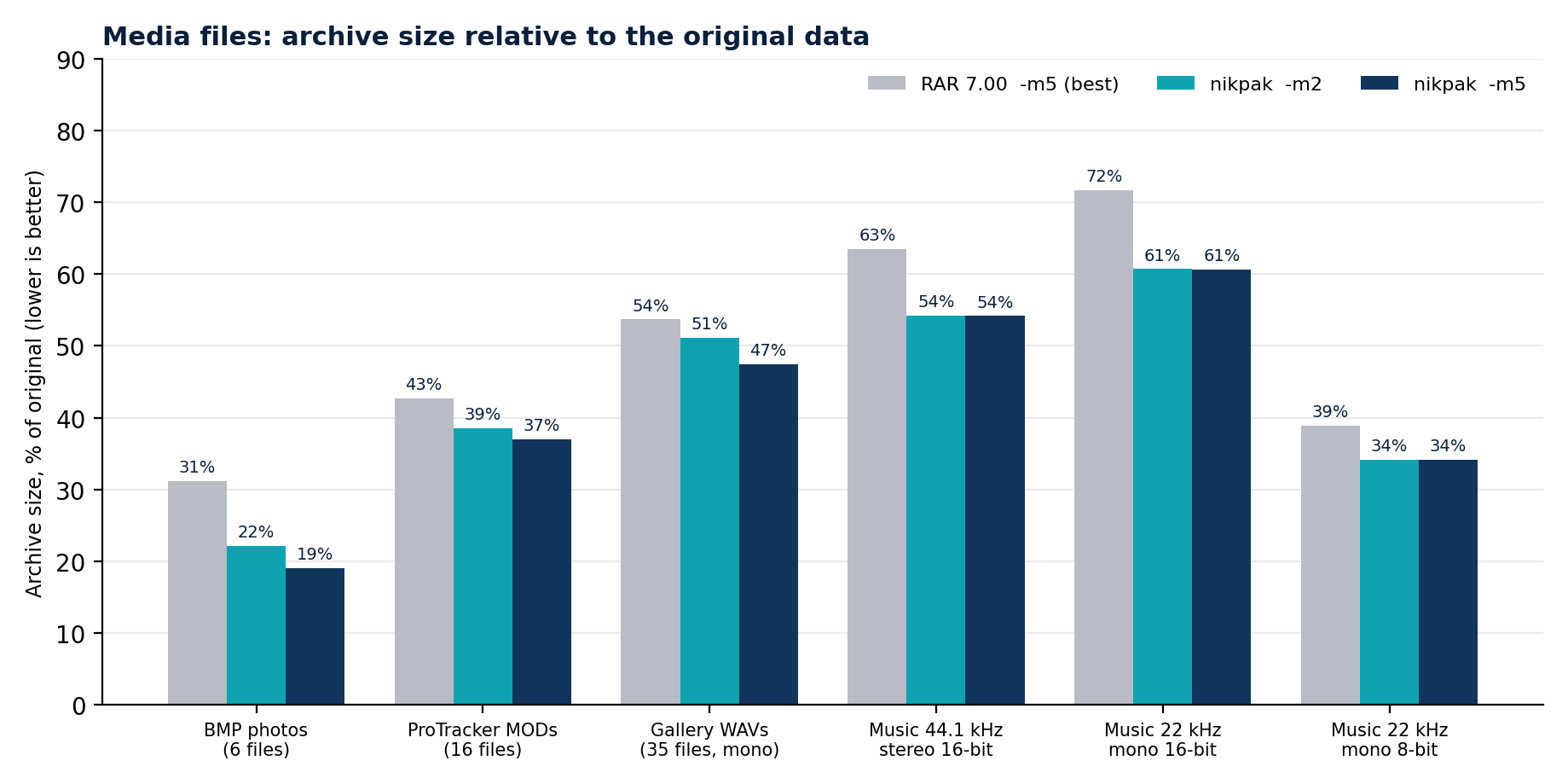
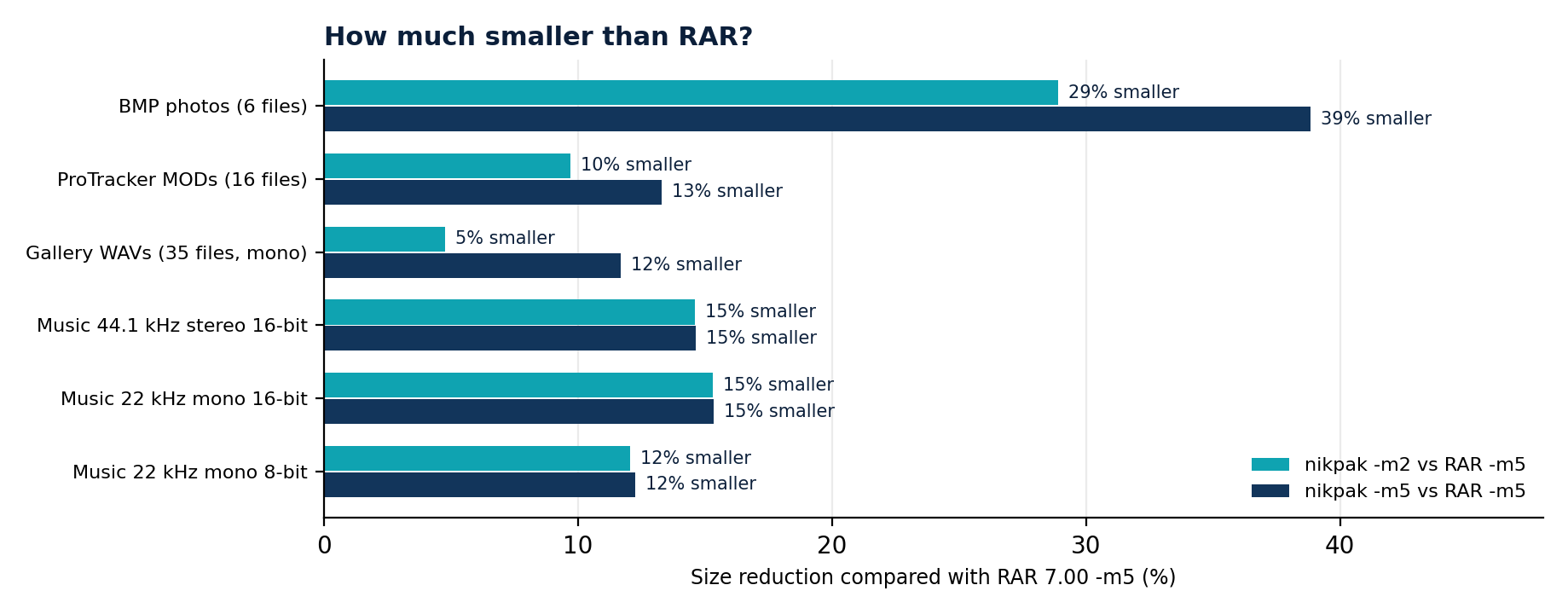
What the media filters add
The same nikpak without media filters (version 1.0, plain Zstandard at the default level) is the right yardstick for the value of the media layer:
| Set | nikpak 1.0 (no filters) | nikpak 1.1 -m2 | Reduction |
|---|---|---|---|
| 6 BMP photographs | 3,580,971 | 2,035,223 | 43.2 % |
| 16 ProTracker MOD files | 1,260,607 | 966,622 | 23.3 % |
| 35 gallery WAVs (mono 16-bit) | 1,876,722 | 1,529,219 | 18.5 % |
| Music 44.1 kHz stereo 16-bit | 15,585,422 | 9,415,519 | 39.6 % |
| Music 22.05 kHz mono 16-bit | 3,887,183 | 2,635,819 | 32.2 % |
| Music 22.05 kHz mono 8-bit | 1,078,493 | 742,462 | 31.2 % |
Comparison with FLAC
For
the 44.1 kHz stereo music FLAC -8,
the dedicated reference encoder, produces 9,407,019 bytes. The NAC
stream for the same audio is 9,425,305 bytes, within 0.2 %, and the
finished nikpak archive 9,415,519 bytes. For the 22 kHz mono and
8-bit versions NAC is smaller than FLAC (2,635,446 against 2,638,954,
and 785,890 against 798,810 for the audio region alone), and for
24-bit the archive (18.69 MB) is smaller than FLAC's 19.12 MB. FLAC
is much weaker on the gallery files (2.50 MB against RAR's 1.61 MB),
for the reason explained in section 7.5; this is the case in which
the other filters earn their place.
11.3 General data
Source code and documents are not media, so this test checks whether nikpak's gains elsewhere cost it anything on ordinary files.
| Tool and level | Size (bytes) | Time | Extraction |
|---|---|---|---|
| nikpak -m5 | 24,443,483 | 45.6 s | 1.8 s |
| RAR 7 -m5 -s -md256m | 25,862,475 | 36.2 s |
|
| RAR 7 -m5 -s | 26,002,812 | 26.7 s |
|
| RAR 7 -m3 -s | 26,536,863 | 16.7 s | 1.5 s |
| nikpak -m4 | 26,814,023 | 13.5 s |
|
| nikpak -m3 | 30,329,965 | 2.0 s |
|
| nikpak -m2 (1.1 default) | 36,266,743 | 0.9 s | 0.8 s |
| RAR 7 -m5 (default, not solid) | 50,851,230 | 14.8 s |
|
| RAR 7 -m3 (default, not solid) | 50,974,773 | 9.7 s | 2.3 s |
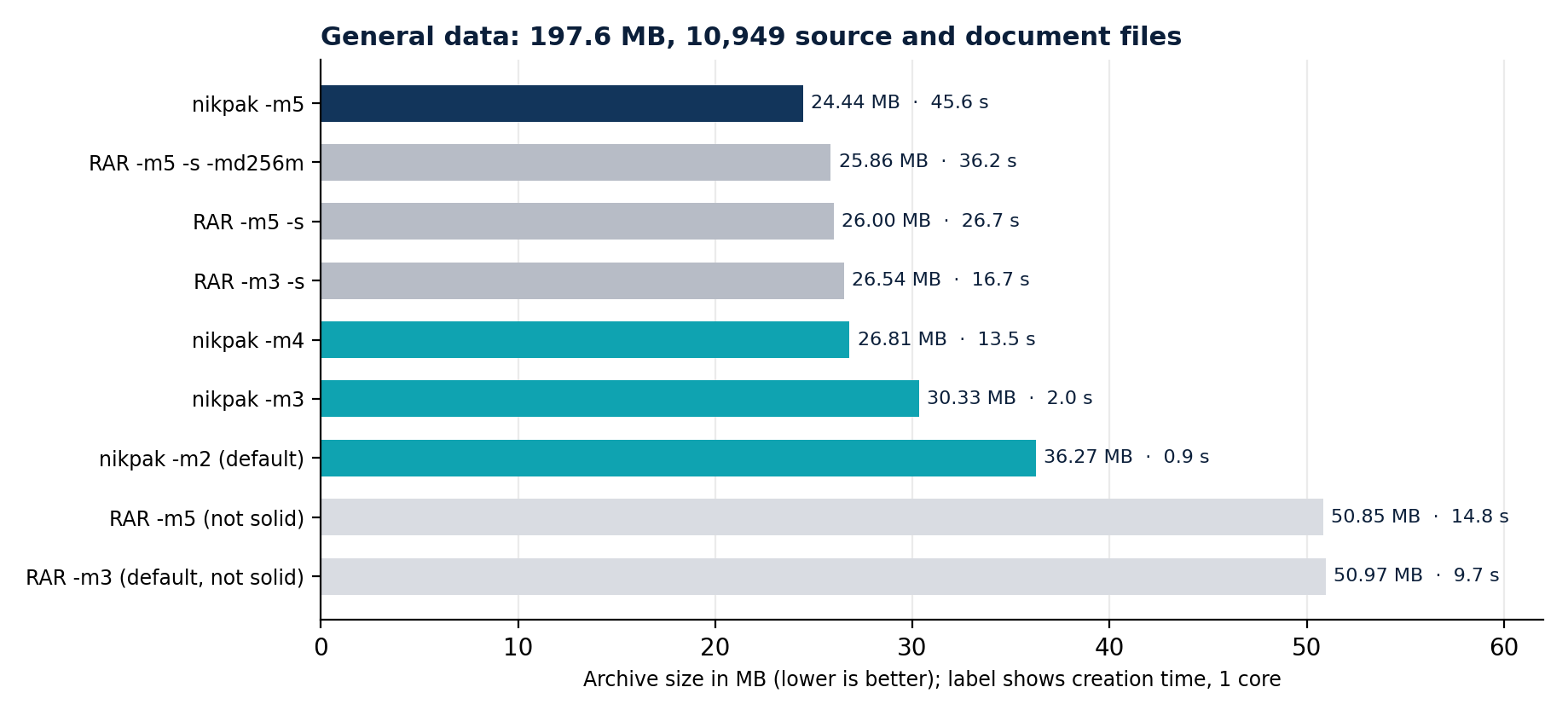
Reading the table honestly:
- Maximum level: nikpak produces an archive 5.5 % smaller than RAR's best (24.4 against 25.9 MB). RAR is faster at this level (26.7 to 36.2 s against 45.6 s).
- Equal
size:
nikpak -m4is within about 1 % of RAR's default solid level in 81 % of the time (13.5 s against 16.7 s). - Fast
levels:
-m2trades ratio for speed: 18 times faster than RAR solid-m3, and 37 % larger. This is the level for backups and pipelines where time matters more than the last few megabytes. - Not
solid:
RAR's default (non-solid) archives are almost twice the size of its
solid ones on this many-small-files data. Anyone comparing nikpak
with RAR should add
-sto RAR.
11.4 Speed on a single large media file
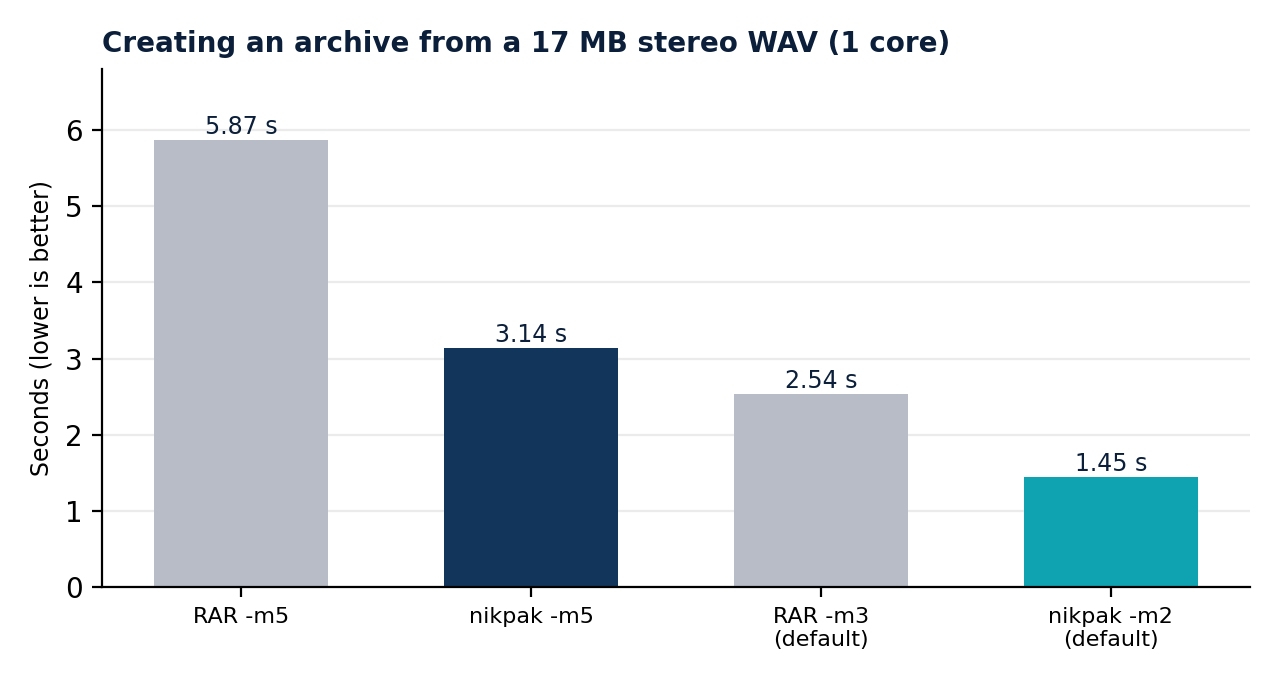
| Operation | nikpak | RAR 7 | Size |
|---|---|---|---|
| Create, fast / RAR default | 1.45 s (-m2) | 2.54 s (-m3) | 9,415,519 vs 11,128,595 |
| Create, maximum level | 3.14 s (-m5) | 5.87 s (-m5) | 9,411,898 vs 11,024,411 |
| Extract | 0.28 s | 0.23 s | same output |
On media nikpak is both smaller and faster to create. RAR extracts a little faster; a likely reason is that NAC decoding performs integer prediction for every sample, which costs somewhat more than the match copying that dominates general decoding.
11.5 Encryption overhead
On the 222 MB data set, an encrypted archive took 0.92 s against 0.64 s unencrypted, and was 11,087 bytes (0.03 %) larger. The difference includes the Argon2id derivation, so the cost is dominated by a fixed fraction of a second.
11.6 Reproducing the results
# media: which filter wins, per file
nikpak mt song.wav tracker.mod photo.bmp
# archive with nikpak and RAR, then compare
nikpak a -q -ep -m2 test.nik *.wav
rar a -ep -m5 -ma5 test.rar *.wav
# fair comparison on many files: give RAR solid mode
rar a -r -s -m5 -ma5 -md256m data.rar data
nikpak a -m5 data.nik data
# verify
nikpak x -o+ test.nik restore\
11.7 Second run: nikpak, RAR 7, 7-Zip and ZIP
Updated for nikpak 1.2.0. In the first version of this run, with nikpak 1.1.0, 7-Zip -mx9 was ahead on text (by 1.4 %), office files (3.3 %) and source code (8.5 %). nikpak 1.2.0 adds Deflate recompression (7.9) and a new maximum level built on LZMA2 and PPMd (6.7), and was measured again on the same machine with the same files. The figures for RAR, 7-Zip and ZIP come from the first run.
Sections 11.2 to 11.5 compare nikpak with RAR only. This second run adds the two archivers most people already have, 7-Zip and the classic ZIP format, and two kinds of files that are archived every day: plain text and office documents (.doc, .docx, .xls, .xlsx, .csv, .pdf). All four tools were run one after another on the same machine and the same files, and RAR was measured again. The corpora were rebuilt from the same public sources, so absolute sizes and times differ from those in 11.2 to 11.4. Compare numbers within this section, not across sections.
Method
| Item | Detail |
|---|---|
| Machine | Linux x86-64 virtual machine (Intel Xeon, 2.8 GHz). Every command was pinned to one CPU core with taskset and run single-threaded (nikpak -mt1, RAR -mt1, 7-Zip -mmt=1; ZIP is single-threaded by design). |
| Software | nikpak 1.2.0 (release build); RAR 7.00 (-ma5, solid); 7-Zip 23.01 (.7z format, LZMA2, solid by default); Info-ZIP Zip 3.0 and UnZip 6.0 (Deflate). |
| Levels | nikpak: the fast level -m2 and the maximum -m5, which is the default since 1.2.1 (and -m4). Others: default and maximum, RAR -m3 -s / -m5 -s, 7-Zip -mx5 / -mx9, ZIP -6 / -9. RAR was given solid mode (-s), because the other three are solid or, in ZIP's case, cannot be. |
| Timing | Wall-clock seconds. Sets under 50 MB: best of three runs. The general set: one run. |
| Verification | All 92 archives were extracted and compared with the original using diff -r. All were identical. |
The test material
| Set | Files | Size (bytes) | Content |
|---|---|---|---|
| BMP images | 8 | 6,987,840 | Six photographs from the scikit-image sample set as 24-bit BMP, plus an 8-bit grayscale photograph and an 8-bit gravel texture. |
| ProTracker MOD | 16 | 2,252,604 | The 16 largest ProTracker modules in the libxmp test collection. |
| Gallery WAVs | 35 | 2,991,820 | The same 35 LibreOffice gallery sounds as in 11.1. |
| Music, four formats | 4 × 1 | 53,417,226 | A new 100-second piece (piano, strings, bass, flute, drums) rendered with TiMidity++ and Freepats at 44.1 kHz stereo 16-bit, then converted by SoX to 22.05 kHz mono 16-bit and 8-bit and 48 kHz stereo 24-bit. |
| Plain text | 18 | 11,793,318 | Eighteen Project Gutenberg books as .txt (Austen, Melville, Shakespeare, the King James Bible and others). |
| Office files | 60 | 39,100,915 | 12 reports as .docx, .doc and .pdf (text, headings, tables and some photos) and 8 sales workbooks of 500 to 30,000 rows as .xlsx, .xls and .csv (with formulas), saved by LibreOffice. |
| General data | 11,473 | 190,454,632 | Python 3.12 and 3.13 standard libraries, Debian Python packages, C headers (/usr/include) and /usr/share/doc. Symbolic links removed. |
Maximum levels: archive size
| Set | Original | nikpak -m5 | RAR 7 -m5 | 7-Zip -mx9 | ZIP -9 |
|---|---|---|---|---|---|
| 8 BMP images | 6,987,840 | 3,557,350 | 4,394,310 | 4,195,043 | 4,974,680 |
| 16 ProTracker MOD files | 2,252,604 | 1,127,607 | 1,264,245 | 1,166,855 | 1,408,085 |
| 35 gallery WAVs (mono 16-bit) | 2,991,820 | 1,346,484 | 1,596,971 | 1,484,879 | 1,852,279 |
| Music 44.1 kHz stereo 16-bit | 17,760,408 | 8,731,989 | 10,460,042 | 10,666,922 | 15,225,764 |
| Music 22.05 kHz mono 16-bit | 4,440,136 | 2,458,867 | 2,797,026 | 2,784,080 | 3,736,722 |
| Music 22.05 kHz mono 8-bit | 2,220,090 | 606,840 | 725,416 | 642,341 | 836,989 |
| Music 48 kHz stereo 24-bit | 28,996,592 | 18,198,056 | 21,229,465 | 25,542,036 | 26,980,770 |
| 18 plain-text books (.txt) | 11,793,318 | 2,741,898 | 3,519,622 | 3,259,868 | 4,223,579 |
| 60 office files | 39,100,915 | 6,887,729 | 11,186,217 | 10,085,779 | 17,399,998 |
| General data (11,473 files) | 190,454,632 | 28,175,618 | 33,606,893 | 28,879,398 | 62,198,510 |
All sizes are in bytes. The smallest archive in each row is shown in bold.
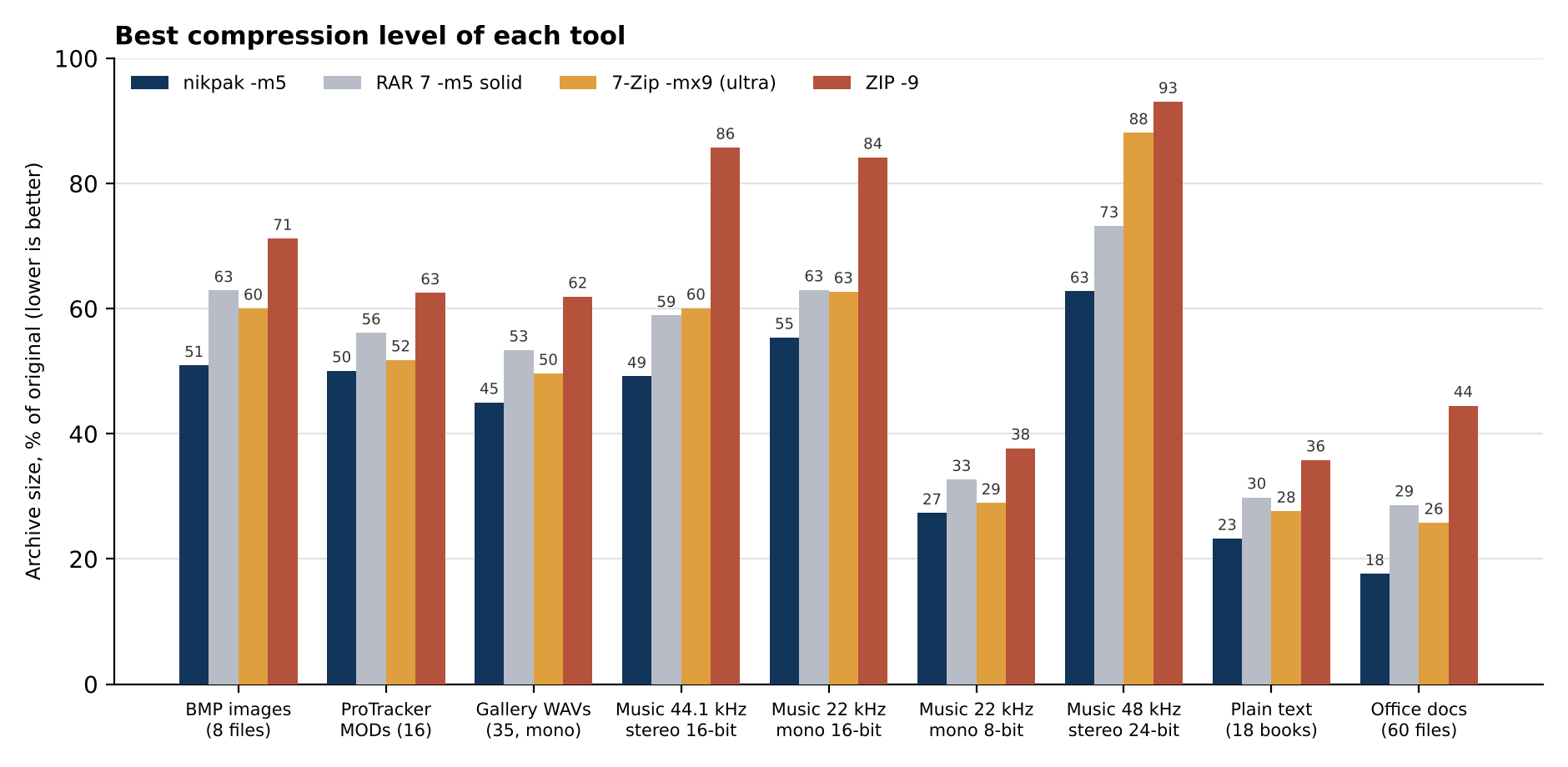
Fast levels: size and creation time
| Set | nikpak -m2 | RAR 7 -m3 | 7-Zip -mx5 | ZIP -6 |
|---|---|---|---|---|
| 8 BMP images | 54.0 % · 0.39 s | 63.0 % · 2.09 s | 60.1 % · 3.51 s | 71.2 % · 0.35 s |
| 16 ProTracker MOD files | 52.4 % · 0.61 s | 56.2 % · 0.43 s | 51.9 % · 0.69 s | 62.7 % · 0.10 s |
| 35 gallery WAVs (mono 16-bit) | 51.1 % · 0.41 s | 53.6 % · 0.71 s | 49.6 % · 1.96 s | 61.9 % · 0.24 s |
| Music 44.1 kHz stereo 16-bit | 49.2 % · 1.72 s | 59.9 % · 3.60 s | 60.1 % · 14.03 s | 85.7 % · 0.82 s |
| Music 22.05 kHz mono 16-bit | 55.4 % · 0.58 s | 64.1 % · 0.95 s | 62.7 % · 2.14 s | 84.2 % · 0.22 s |
| Music 22.05 kHz mono 8-bit | 27.4 % · 0.77 s | 33.3 % · 0.52 s | 28.9 % · 2.13 s | 38.2 % · 0.32 s |
| Music 48 kHz stereo 24-bit | 62.8 % · 2.06 s | 73.6 % · 7.54 s | 88.1 % · 13.54 s | 93.0 % · 1.19 s |
| 18 plain-text books (.txt) | 35.2 % · 0.11 s | 30.4 % · 5.53 s | 27.7 % · 11.76 s | 36.0 % · 0.89 s |
| 60 office files | 38.0 % · 0.22 s | 29.5 % · 8.25 s | 26.2 % · 21.85 s | 44.7 % · 1.83 s |
| General data (11,473 files) | 25.3 % · 1.67 s | 18.0 % · 48.19 s | 17.0 % · 93.71 s | 32.9 % · 7.32 s |
nikpak -m2 against the default level of the other tools. Each cell shows the archive size as a percentage of the original and the creation time on one core. The smallest archive in each row is in bold.
General data in detail
| Tool and level | Size (bytes) | % of original | Creation | Extraction |
|---|---|---|---|---|
| nikpak -m5 | 28,175,618 | 14.8 % | 154.3 s | 5.6 s |
| 7-Zip -mx9 | 28,879,398 | 15.2 % | 120.9 s | 6.0 s |
| RAR 7 -m5 -s -md256m | 32,350,575 | 17.0 % | 73.6 s | 7.0 s |
| 7-Zip -mx5 | 32,375,802 | 17.0 % | 93.7 s | 4.5 s |
| nikpak -m4 | 33,295,133 | 17.5 % | 37.8 s | 3.3 s |
| RAR 7 -m5 -s | 33,606,893 | 17.6 % | 72.4 s | 6.7 s |
| RAR 7 -m3 -s | 34,236,198 | 18.0 % | 48.2 s | 5.9 s |
| nikpak -m2 | 48,229,284 | 25.3 % | 1.7 s | 0.9 s |
| RAR 7 -m3 (not solid) | 56,038,351 | 29.4 % | 20.2 s | 6.9 s |
| ZIP -9 | 62,198,510 | 32.7 % | 28.2 s | 6.9 s |
| ZIP -6 | 62,672,415 | 32.9 % | 7.3 s | 5.4 s |
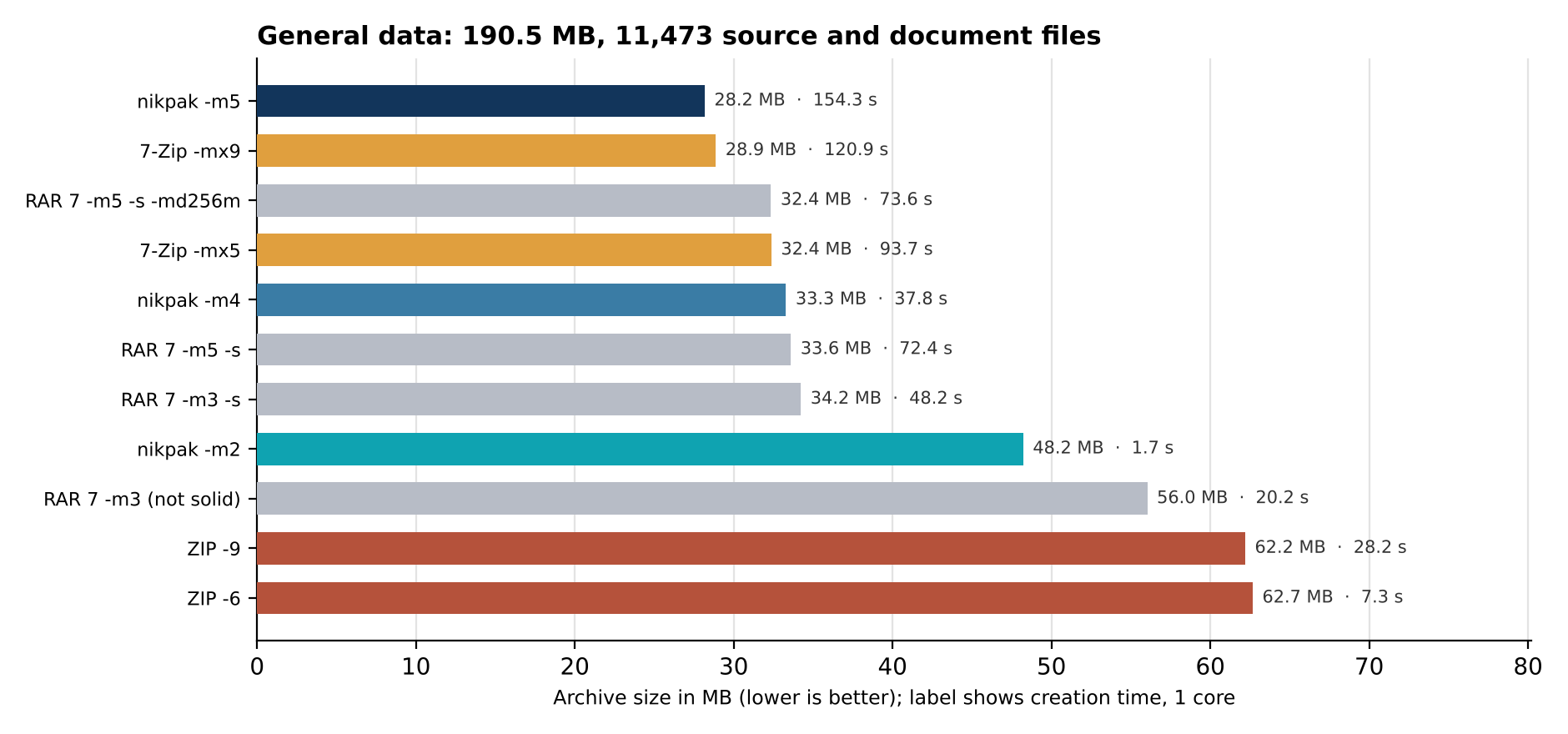
From 1.1.0 to 1.2.0
| Set | nikpak 1.1.0 -m5 | nikpak 1.2.0 -m5 | 7-Zip -mx9 | 1.2.0 vs 7-Zip |
|---|---|---|---|---|
| 18 plain-text books | 3,306,819 | 2,741,898 | 3,259,868 | 15.9 % smaller |
| 60 office files | 10,417,750 | 6,887,729 | 10,085,779 | 31.7 % smaller |
| General data | 31,322,041 | 28,175,618 | 28,879,398 | 2.4 % smaller |
Reading the results honestly
- nikpak -m5 is smallest on every set. Against 7-Zip -mx9 it is 2.4 to 31.7 % smaller, against RAR 7 -m5 10.8 to 38.4 % and against ZIP -9 19.9 to 60.4 %. On recorded audio NAC predicts what LZ-based compressors can only match: on the 24-bit music 7-Zip saves 12 % and nikpak 37 %.
- Office files: 31.7 % smaller than 7-Zip. Deflate recompression turns 6.6 MB of .xlsx and 1.9 MB of .docx into plain XML that LZMA2 compresses far better than Deflate did (6.89 MB against 10.09 MB). Even -m4 is 1.3 % smaller than 7-Zip -mx9 and faster (16 s against 26 s). The price at -m5 is time: 81 s against 26 s.
- Text: 15.9 % smaller, in half the time. PPMd wins on prose (6.4 s against 12.9 s to create). Because PPMd decodes as slowly as it encodes, extraction takes 2.7 s instead of 0.2 s.
- Source code: 2.4 % smaller, a narrow lead. 28.2 MB against 28.9 MB, in 154 s against 121 s. Sorting by file type and choosing the engine on contiguous samples (6.7) made the difference.
- Fast level -m2: fastest, not smallest. nikpak -m2 needs 1.7 s for the general set, against 93.7 s for 7-Zip -mx5 (56 times longer), 48.2 s for RAR and 7.3 s for ZIP. It is smaller than 7-Zip -mx5 on images and on most audio (MOD files and the gallery WAVs are 1 to 3 % larger), but larger on text, office files and source code (49.0 % on the general set). For this reason, since version 1.2.1 nikpak uses -m5 by default; -m2 has to be asked for.
- ZIP is fast but largest everywhere. Even nikpak -m2 beats ZIP -9 on every set. ZIP creates small media archives faster than nikpak -m2, because Deflate does far less work than the NAC codec, but it is slower on text, office files and source code.
- Extraction. The general set extracts in 0.9 s (nikpak -m2) or 5.6 s (-m5), against 6.0 s for 7-Zip, 6.7 s for RAR and 6.9 s for ZIP. Archives with recompressed Deflate streams extract more slowly, because every stream is rebuilt (2.1 s against 0.7 s for the office set).
- RAR on this machine. RAR was slower here than in 11.3 (72 s instead of 27 s for -m5 -s on a similar amount of source code). Machine and data differ, so the two sections should not be mixed. Within this run every tool met the same conditions.
What this means for nikpak
At the maximum level nikpak 1.2.0 makes the smallest archive of all four tools on every set measured, 2.4 to 31.7 % smaller than 7-Zip -mx9. The cost is speed: -m5 is single-threaded and slower than 7-Zip on office files and source code. Making it faster is on the roadmap (section 15.2).
12 nikpak and RAR compared
RAR is an excellent and widely used archiver, and this chapter does not pretend otherwise. It sets out where the measurements and the design favour nikpak, where RAR is ahead, and who should choose what.
12.1 Where nikpak is ahead
| Area | nikpak | Evidence |
|---|---|---|
| Audio, images, tracker music | 12 - 39 % smaller than RAR 7 -m5 on every media set measured | Section 11.2 |
| Source code, maximum level | 5.5 % smaller than RAR's best solid setting | Section 11.3 |
| Speed at the fast level -m2 | 0.9 s against 9.7 - 16.7 s for 197 MB; 1.45 s against 2.54 s for a WAV | Sections 11.3, 11.4 |
| Cipher and mode | XChaCha20-Poly1305, authenticated; RAR5 uses AES-256 in CBC mode, which is not authenticated and relies on separate checksums | Chapter 8 |
| Password hashing | Argon2id, memory-hard (64 MiB); RAR5 uses PBKDF2-HMAC-SHA256, which is CPU-bound and parallelises cheaply on GPUs | Section 8.2 |
| File-name privacy |
Always
encrypted; RAR needs the -hp
switch | Section 8.4 |
| Password generation | Built in: strong random password when none is given | Section 3.3 |
| Tamper evidence | Reordering, truncation and header changes are detected cryptographically | Section 8.6 |
| Transparency | Complete source and documented format; implementation in memory-safe Rust | Chapters 5, 10 |
| Distribution | One static executable (drop window and command line; about 2.3 MB without the window), or a small Windows installer; shareware, free for personal use (3.8) | Chapter 13 |
12.2 Where RAR is ahead
| Area | RAR 7 | nikpak today |
|---|---|---|
| Recovery records | Can repair damaged archives | Detects damage, cannot repair it |
| Multi-volume archives | Yes | No |
| Self-extracting archives | Yes | No |
| Updating an archive | Add, replace and delete files in place | Create or overwrite only |
| Graphical interface | WinRAR, with shell integration | Drop window for compressing (3.7); no shell integration, extraction from the command line |
| Maximum-level speed | 26.7 - 36.2 s on the general set | 45.6 s |
| Extraction speed on media | 0.23 s for the 17 MB WAV | 0.28 s |
| Maturity and reach | Decades of field testing; millions of existing .rar files | New; no independent audit; reads only .nik |
12.3 Quantum resistance in perspective
Both nikpak and RAR5 encrypt with a 256-bit symmetric key, so both are untouched by Shor's algorithm and both keep about 128 bits of security against Grover's. Neither claim distinguishes them. What nikpak adds on top is a memory-hard password step (which makes the dominant real-world attack, password guessing, far more expensive) and authenticated encryption (which makes tampering detectable). It has also been designed from the start on the assumption that no public-key primitive will ever be part of the archive format, and its roadmap commits to a hybrid post-quantum scheme if public-key sharing is added.
12.4 Which one to choose
- Choose nikpak for archives of audio, images, tracker music and source code where size and speed matter, for scripted backups, for strong default encryption, and when an open, documented format is valuable.
- Choose RAR when you need recovery records, multi-volume or self-extracting archives, in-place updates, or must exchange archives with people who only have RAR tools.
- Use both: nothing stops a workflow from using nikpak for bulk media and encrypted backups while keeping RAR for distribution.
12.5 And 7-Zip and ZIP?
Section 11.7 measures nikpak 1.2 against 7-Zip 23.01 and Info-ZIP 3.0 as well. In short:
- Choose nikpak -m5 for the smallest archive. It is 2.4 to 31.7 % smaller than 7-Zip -mx9 on every set measured: 31.7 % on office files, 15.9 % on text and 2.4 % on source code. Choose nikpak -m2 for fast backups (56 times faster than 7-Zip's default on source code). nikpak also has stronger encryption: 7-Zip uses AES-256 with a SHA-256 key derivation that is not memory-hard, and it only hides file names with -mhe.
- Choose 7-Zip when time matters more at the maximum level (it is faster on large office and source-code sets), when you need its default level to be small on documents, or when you need to open the many formats 7-Zip reads.
- Choose ZIP only for compatibility. Every operating system opens it without extra software, but nikpak -m5 is 19.9 to 60.4 % smaller, and ZIP's traditional encryption is weak.
13 Building, deploying and integrating
13.1 Windows with PowerShell
nikpak is written in Rust and built with Cargo. On Windows, Rust needs a C/C++ linker, which comes from the Visual Studio Build Tools. In an administrator PowerShell, install both once and then reopen PowerShell:
winget install Rustlang.Rustup
$o = '--wait --passive --add Microsoft.VisualStudio.Workload.VCTools'
$o += ' --includeRecommended'
winget install Microsoft.VisualStudio.2022.BuildTools --override $o
If
winget
is not available, install Rust from rustup.rs and the Build
Tools for Visual Studio
with the Desktop
development with C++
workload. Then, in the folder that contains the sources:
.\build.ps1 # builds dist\nikpak.exe and dist\unNik.exe
.\build.ps1 -Test # runs the unit tests first
# if PowerShell refuses to run scripts:
powershell -ExecutionPolicy Bypass -File .\build.ps1
build.ps1
checks that Cargo is installed (and says how to install it if not),
runs the build, explains the usual cause if it fails, and copies the
executable to dist\nikpak.exe.
The Windows installer
.\build.ps1 -Installer
(or npm run installer)
also builds the setup program dist\nikpak-
with Inno
Setup 6.3 or newer
(install it once with winget install JRSoftware.InnoSetup).
The script is installer\nikpak.iss;
the version is taken from Cargo.toml. This setup file is what is
uploaded to shareware and download sites.
- By default it installs for the current user only, without administrator rights or a UAC prompt, into %LOCALAPPDATA%\Programs\NikPak. Its first page offers "install for all users" (Program Files, needs administrator rights).
- It shows LICENSE.txt for acceptance and installs nikpak.exe, unNik.exe, the icons, LICENSE.txt, THIRD-PARTY-NOTICES.txt and CHANGELOG.md. It adds a Start menu entry, an optional desktop icon and, on request, the folder to the PATH for the command line. It registers an uninstaller in Settings > Apps.
- Shortcuts: NikPak, unNik and the licence in the Start menu; NikPak on the desktop (always) and unNik on the desktop as an option.
- .nik files are always registered (since 1.5.2): they get their own icon (nikfile.ico, a page with a zipper, like .zip files), the type name "NikPak archive", and a double-click opens them in unNik ("Open with unNik" in the right-click menu). unNik is also listed in "Open with" and in Default apps. The uninstaller removes the registration. If .nik files were already set to open with another program, Windows keeps that choice until unNik is picked once in "Open with".
- The final "Launch NikPak" starts NikPak as the normal user, never as administrator, so drag and drop works. Updates install over the previous version (fixed AppId). The licence in %APPDATA%\nikpak is kept on update and uninstall. The setup never contains keys or key files.
- The installer runs in English or French, following Windows. Before publishing, sign nikpak.exe and the setup with a code-signing certificate, so that Windows SmartScreen does not warn about an unknown publisher.
buildall.ps1
builds everything that is published in one run — nikpak.exe,
unNik.exe,
the two setups and SHA256SUMS.txt
— copies them into binaries\,
rebuilds the web site and uploads it by FTP (-NoUpload
skips the upload). The second setup, unnik-
(installer\unnik.iss),
installs unNik alone, the free archive browser; when NikPak is
already installed it only installs the program, so the menus never
double.
13.2 Building with npm
Rust
projects do not use npm, so npm is never required. For convenience,
the project contains a small package.json
whose scripts simply call Cargo, so that a developer who lives in a
Node.js workflow can type familiar commands:
npm run build # cargo build --release
npm run dist # build.ps1 -> dist\nikpak.exe
npm test # cargo test --release
npm run clean # cargo clean
13.3 A self-contained executable
The
file .cargo/config.toml
links the C runtime statically for the Windows MSVC targets. The
resulting nikpak.exe
(several MB with the graphical interface, about 2.3 MB without it)
therefore has no DLL dependencies and does not need the Visual
C++ Redistributable
on the machines where it runs. Copy it to a folder on the PATH
to use it anywhere. The release profile enables full optimisation,
link-time optimisation, a single code-generation unit, symbol
stripping and panic = abort
for a small, fast binary.
13.4 macOS and Linux
./build.sh # builds and copies the result to dist/nikpak
# or: cargo build --release
sudo cp dist/nikpak /usr/local/bin/
On
macOS install the command-line tools first (xcode-select --install);
on Debian or Ubuntu install a C compiler (sudo apt install build-essential).
Rust itself comes from curl --proto '=https' --tlsv1.2 -sSf https://sh.rustup.rs | sh.
The compression library is compiled from its C sources by Cargo, so
no system library is needed.
The
site's macOS and Linux downloads are made by ./package-unix.sh,
which builds nikpak and unNik and packs them with an install.sh
into binaries\nikpak-
(a universal binary: Intel + Apple silicon) or
binaries\nikpak-.
Set ZIG=1
on Linux to build with cargo-zigbuild against glibc 2.28, so the
programs also run on older distributions.
13.5 Dependencies
Since version 1.2 nikpak needs Rust 1.89 or newer. build.ps1 and build.sh check the installed version and run rustup update stable when it is older. With npm, run rustup update once before npm run build.
nikpak
depends on a small set of mature crates. Their exact versions are
fixed in Cargo.lock,
which is part of the source package, so every build uses the same
code.
| Crate | Purpose |
|---|---|
zstd | Zstandard compression, with multi-threading |
chacha20poly1305 | XChaCha20-Poly1305 and the STREAM construction (RustCrypto) |
argon2 | Argon2id key derivation (RustCrypto) |
rand | Access to the operating system's secure random generator |
zeroize | Wiping keys and passwords from memory |
rpassword | Reading a password without echo, on every platform |
crc32fast | Fast CRC32 |
glob | Wildcard expansion (PowerShell does not expand wildcards for native programs) |
liblzma | LZMA2 engine for -m5 (liblzma, compiled statically from C sources) |
ppmd-rust | PPMd variant I engine for text at -m5 |
preflate-rs | Bit-exact Deflate recompression (Microsoft, Apache-2.0); a vendored copy in vendor/preflate-rs whose LGPL entropy coder (cabac) is replaced by nikpak's own range coder, so nikpak contains no LGPL code. Requires Rust 1.89 or newer |
eframe / egui | The graphical interface (optional cargo feature gui, on by default) |
rfd | Native folder dialog for Browse |
ed25519-dalek | Verification of licence key signatures (section 3.8) |
rustybuzz, unicode-bidi | Shaping and right-to-left ordering of Hindi, Bengali and Arabic in the window (optional cargo feature gui) |
13.6 Scripting
Predictable exit codes and the environment-variable password make nikpak easy to script. A PowerShell backup that treats warnings as acceptable and anything worse as a failure:
$archive = "D:\Backups\docs-$(Get-Date -Format yyyy-MM-dd).nik"
# the password comes from a file or secret store, not from the script
$env:NIKPAK_PASSWORD = Get-Content "$env:USERPROFILE\.nikpak-secret"
nikpak a -p -m3 -inul $archive "$env:USERPROFILE\Documents"
if ($LASTEXITCODE -gt 1) { throw "nikpak failed: $LASTEXITCODE" }
nikpak t -inul $archive # verify what was written
if ($LASTEXITCODE -ne 0) { throw "archive verification failed" }
The same in a shell script, using the bare list command to feed other tools:
export NIKPAK_PASSWORD="$(cat ~/.nikpak-secret)"
nikpak a -p -m3 -inul "backup-$(date +%F).nik" ~/Documents || [ $? -eq 1 ]
nikpak lb backup-2026-10-16.nik | grep -i '\.wav$'
13.7 Total Commander
The
integration described in section 3.6 relies on nikpak following RAR's
syntax. A short checklist: register the extension nik;
use a
for packing and x
for unpacking; let the front-end pass @listfile
for long file lists; give -o+
or -y
for unattended extraction; and pass the password with -p
or the NIKPAK_PASSWORD
variable, since a graphical front-end has no console on which to
prompt.
14 Testing and verification
Because an archiver holds people's data, nikpak is tested at four levels.
14.1 Unit tests
Thirty-four
automated tests run with cargo test --release:
| Area | What is checked |
|---|---|
| Encryption stream | Round trips at 0, 1, 100, 65,535, 65,536, 65,537, 131,072, 131,077 and 327,803 bytes (around the 64 KiB chunk boundaries); a wrong header (associated data), a wrong key and truncation must all fail. |
| Key-derivation limits | Hostile Argon2id parameters (huge memory, zero passes, zero lanes, excessive passes) are refused. |
| NAC audio codec | Lossless round trip for 8/16/24/32-bit audio, 1, 2, 3 and 6 channels, nine signal types (silence, noisy sine, white noise, full-scale square wave, ramp, single impulse, constant maximum, wasted low bits, constant minimum), eight block lengths from 1 to 5000 samples, three effort levels and forced verbatim coding. |
| Audio methods | NAC, Shuffle and Shuffle+Delta across all bit depths, channel counts, byte orders and signedness, including blocks that do not divide evenly. |
| Detection and files | WAV (mono, stereo, 8/16/24/32-bit, extensible, six channels, trailing chunks, odd leftover bytes, zero and oversized data length), AIFF, MOD (also truncated) and BMP (8/24/32-bit, row padding, trailing data); floating-point WAV, tiny files and text must not be detected; every file round-trips through every applicable filter. |
| Robustness | Thousands of random and bit-flipped blocks fed to the audio decoder and the media decoder: they must return errors, never panic or exhaust memory. |
| Framing and helpers | Chunk framing with trailing data, path sanitising, wildcard and filter matching, date formatting, password generation. |
| Deflate recompression | ZIP containers at Deflate levels 1, 3, 6 and 9, PDF with two zlib streams, three-member gzip, non-containers; 400 damaged or truncated recompressed streams must fail cleanly (preflate panics are caught). |
| Multi-engine blocks | Round trips through zstd, LZMA2 and PPMd blocks around the 256 KiB frame boundary; 300 damaged or truncated bodies; hostile engine parameters; the PPMd/LZMA2 trial. |
| Graphical interface | Run on a virtual display (Xvfb): idle, hover, progress and done screens checked visually; a dropped folder archived and extracted byte for byte; Cancel and closing during compression leave no file behind; no display falls back to the usage text. |
| Licence | Keys made by nikpak-keygen and by the PHP kit are identical and accepted; a changed name, e-mail, type or key, and keys signed by another key, are rejected. On a virtual display: reminder in both button orders, wrong key error, successful registration, restart without reminder; text stays inside the boxes. |
| Languages | Every language translates every text with the same placeholders; Devanagari vowel signs and Arabic joining are shaped; on a virtual display all ten languages were checked screen by screen (reminder, idle, progress, done, About, registration, language menu); choosing a language saves it and restarts nikpak in it. |
| Archive API | Reading the index, extracting one file from inside a folder (it lands without the folder's path), deleting a folder with its contents and deleting everything, for -m5, zstd + encryption and stored archives; a wrong password is reported as such. |
| Archive browser | Tree building with implied folders, text detection and decoding (UTF-8, UTF-16, Windows-1252), line wrapping and search in the viewer. On a virtual display: opening, password, navigation, selection, search, viewer, extract, delete and test, in several languages. |
| Skins and file-manager menu | The Linux menu files are generated and checked; one archive for a selection started as three programs; --add-here with three items and --extract-here / --extract-to under a virtual display; encrypted archives ask for their password and extract identical files; every new interface text is translated in the ten languages (the every-language-translates-every-text assertion). |
14.2 End-to-end tests
- Every benchmark archive was extracted and compared with its source, byte for byte (SHA-256 for the 10,949-file set), at several levels.
- A mixed archive (WAV, MODs, BMP, text, random data, subfolders) was created, listed, tested, extracted completely, and a single file was extracted from its middle.
- The same archive was created with encryption, tested with the right and wrong password, and extracted.
- Archives written by the previous format version (1.0) were opened by 1.1.
- Interactive password entry was exercised through a pseudo-terminal: matching passwords, a mismatch, an empty entry (generation), correct and wrong passwords on opening.
14.3 Attack tests
Tampering, truncation, chunk reordering, header manipulation, garbage files and the path-traversal archives of section 10.1 were run against every release candidate. The results are tabulated in sections 8.6 and 10.1; the expected outcome in every case is a refusal, a clear message and a non-zero exit code, never a panic and never a write outside the destination.
14.4 Defects found by testing
The test campaign is the reason several defects do not exist in the released program. Two examples: a Rice-parameter search that failed for 32-bit audio and would have written a multi-gigabyte code (found by the unit test matrix and fixed), and a zstd checksum failure that was reported with the generic exit code 2 instead of 3 (found in the tamper tests and fixed). A third example is the benchmark methodology itself: the first comparison with RAR used its non-solid default, which flattered nikpak on source code; it was redone in solid mode, and the results in chapter 11 are the corrected ones.
15 Limitations and roadmap
15.1 Current limitations
| Limitation | Detail and workaround |
|---|---|
| No recovery records, volumes or SFX | Damage is detected, not repaired (keep a second copy of important archives); split large archives with a general tool if required. |
| No in-place update |
The
format is one solid stream. Deleting (nikpak d, or Delete in
unNik) writes the archive again; adding files to an existing
archive is not supported: create a new archive, or overwrite with
-o+. |
| Sequential access | Extracting one file from a very large archive reads what precedes it (media entries are skipped without decoding); unNik stops reading after the last chosen file. |
| Media coverage | Integer PCM WAV and AIFF, ProTracker MOD, uncompressed BMP. Float WAV, ADPCM, XM/S3M/IT and compressed images are stored with normal compression. |
| Memory at high levels |
-m4
and -m5
archives use a 128 MiB window; decompressing them needs that much
memory. |
| Maximum level -m5 |
Single-threaded and the slowest level. Creating needs up to about 1.1 GB of memory, extracting up to about 350 MB. |
| Symbolic links and dates | Links are skipped when archiving and refused when extracting; dates are listed in UTC. |
| Security review | Not independently audited. |
| Windows and macOS builds |
Developed,
tested and benchmarked on Linux. The Windows- and macOS-specific
code paths were reviewed by hand but have not yet been exercised
on those systems: run cargo test --release
there before relying on a build. |
15.2 Roadmap
| Item | Purpose |
|---|---|
| Recovery records | Reed-Solomon parity so that damaged archives can be repaired, the main feature RAR users miss. |
| Multi-volume archives and update support | Splitting large archives, adding and replacing files. |
| Public-key sharing with a hybrid scheme | Encrypt an archive to a recipient's key with X25519 combined with ML-KEM, safe if either component holds. |
| More media filters | Floating-point audio, XM/S3M/IT trackers, recompression of PNG, a 2-D filter for TGA and uncompressed TIFF. |
| Reading ZIP and RAR, shell integration | Unpack the common formats in unNik and drag files out of unNik, so that nikpak can be the only tool installed. (The Explorer and Finder context menus landed in 1.5.5, section 3.11.) |
| Faster maximum level | -m5 is single-threaded and up to three times slower than 7-Zip -mx9 on office files: multi-threaded LZMA2 and PPMd blocks, deduplication of identical files, and a BCJ filter for executables. |
| External security review | An independent audit of the cryptographic code and the extractor. |
Licence:
NikPak is closed-source shareware, © 2026 Nicolas Choukroun,
distributed by Nikkoid LLC (LICENSE.txt, section 3.8); unNik is
freeware (section 3.9). The open-source components it contains are
listed with their licences in THIRD-PARTY-NOTICES.txt, which must be
shipped with every copy. Keep the private licence key
(keys/nikpak-private.key) out of every published package and out of
the web root. Keep Cargo.lock
in the repository so that builds are reproducible, and run cargo test --release
in the continuous-integration job of each platform you support.
A Appendix A: format constants and limits
| Item | Value |
|---|---|
| Magic |
89 4E 49 4B 0D 0A 1A 0A |
| Format version | 3 (readers accept 1, 2 and 3) |
| Header size | 12 bytes; 59 bytes when encrypted |
| Record types | 0 END, 1 FILE, 2 DIR, 3 MEDIA |
| Archive methods | 0 store, 1 Zstandard, 2 multi-engine blocks |
| Block engines | 1 Zstandard; 2 LZMA2 (dictionary up to 128 MiB written, 1.5 GiB accepted); 3 PPMd8 (order 8, 192 MiB written; order 2-16, 1 GiB accepted) |
| Deflate recompression | ZIP, PDF, gzip; file up to 512 MiB; per stream up to 512 MiB plain data and 64 MiB corrections |
| Maximum name length | 4096 bytes |
| Encrypted chunk |
64
KiB of plaintext + 16-byte tag, u32
big-endian length in front |
| Argon2id (written) | 64 MiB, 3 passes, 4 lanes, 16-byte salt, 32-byte key |
| Argon2id (accepted) | memory 8 x lanes .. 1 GiB, passes 1 .. 64, lanes 1 .. 64 |
| Stream nonce | 19-byte random prefix + 32-bit counter + 1-byte last flag = 24 bytes |
| Minimum password length | 8 characters |
| Generated password | 24 characters, 56-symbol alphabet, about 139 bits |
| Media minimum file size | 8 KiB (region at least 4 KiB) |
| NAC block | 4096 sample frames; Shuffle block 32768 frames |
| Trial | up to three 768 KiB windows (5 %, 45 %, 85 %); whole region if up to 3 MiB; 2 % margin |
| BMP region limit | 256 MiB |
| Zstandard window | default; 2^27 with long-distance matching at -m4 and -m5 |
| Threads |
1
.. 256 (-mt) |
B Appendix B: glossary
| Term | Meaning |
|---|---|
| AEAD | Authenticated encryption with associated data: encrypts and detects any modification, also of data that is sent in clear (such as the header). |
| Argon2id | A memory-hard password-hashing function standardised in RFC 9106; turns a password into a key at a deliberately high memory cost. |
| CRC32 | A 32-bit checksum that detects accidental damage. Not a security feature. |
| FSE | Finite-state entropy: the table-driven entropy coder used by Zstandard. |
| Grover's algorithm | A quantum search algorithm with a quadratic speed-up; halves the effective length of symmetric keys. |
| LPC | Linear predictive coding: predicting a sample from a weighted sum of the preceding ones. |
| Levinson-Durbin | A recursion that computes optimal predictor coefficients of every order from the autocorrelation of a signal. |
| LZMA2 | The Lempel-Ziv-Markov chain algorithm used by 7-Zip and xz: LZ77 matching with optimal parsing and a binary range coder. |
| MED | Median edge detector: a pixel predictor from the LOCO-I / JPEG-LS image coder. |
| Memory-hard | A function whose cost is dominated by memory, which limits the speed-up available from GPUs and custom chips. |
| NAC | nikpak's lossless audio codec. |
| PPMd | Prediction by Partial Matching (variant I): predicts each byte from the preceding up to 8 bytes; very strong on text. |
| preflate | A method (and library) that turns a Deflate stream into its plain data plus small corrections, from which the identical Deflate stream can be rebuilt. |
| Rice coding | A simple, fast code for numbers with a roughly geometric distribution: a unary quotient and a fixed number of low bits. |
| Shor's algorithm | A quantum algorithm that factors integers and computes discrete logarithms, breaking RSA and elliptic-curve cryptography. |
| Solid archive | An archive compressed as one continuous stream, so that redundancy between files can be exploited. |
| STREAM | A construction that encrypts a long message as authenticated chunks with counter and last-chunk flag in the nonce. |
| Zig-zag mapping | Mapping signed integers to unsigned ones (0, -1, 1, -2 ... to 0, 1, 2, 3 ...), so that small magnitudes become small numbers. |
| Zstandard | A modern open compression format combining LZ77 matching with Huffman and FSE entropy coding. |
Version 1.6.2 · October 2026 Page 19